How to Use Google Analytics for SEO

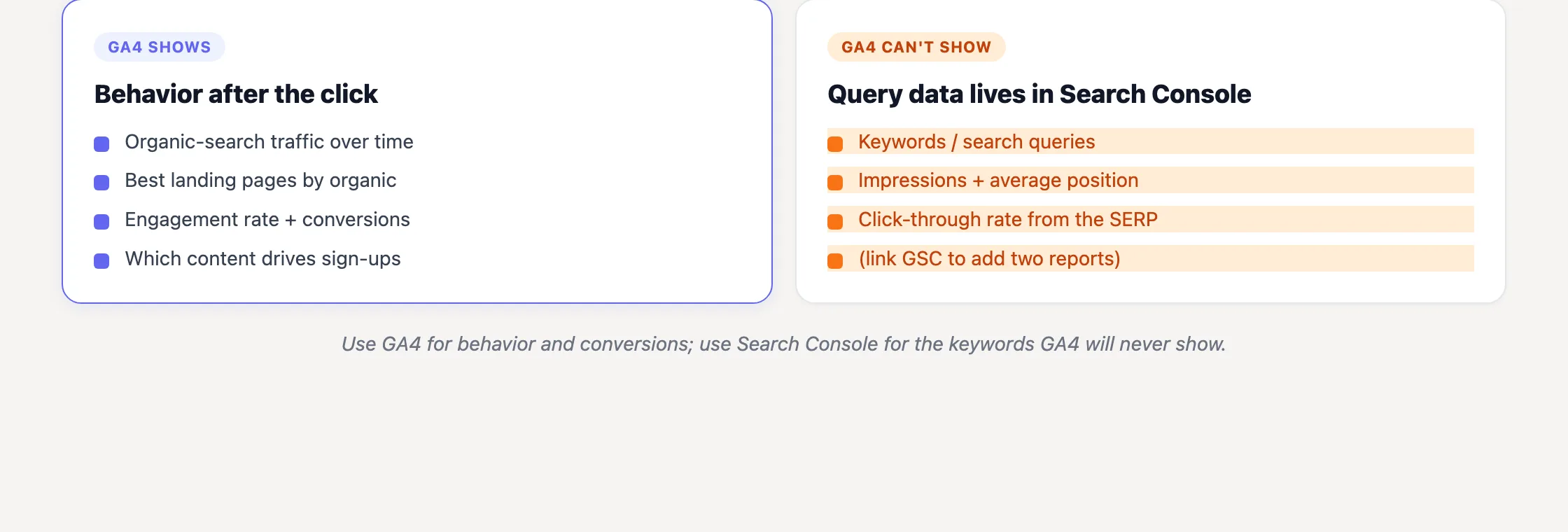
TL;DR: GA4 shows what happens after someone arrives from search: sessions, landing pages, engagement, and key events. It does not show the keywords they searched. Use Google Search Console for queries, impressions, CTR, and average position, then connect the two products to compare search visibility with post-click results at the landing-page level.
| SEO question | Use | Where to look |
|---|---|---|
| How much traffic comes from unpaid search? | GA4 | Reports > Acquisition > Traffic acquisition |
| Which pages bring in organic visitors? | GA4 | Reports > Engagement > Landing page |
| Do organic visitors engage or convert? | GA4 | Landing page report or exploration, filtered to Organic Search |
| Which queries generated clicks and impressions? | Google Search Console | Performance report |
| What are my keyword positions? | Search Console or a rank tracker | Average position in GSC, or dedicated keyword tracking |
The distinction worth remembering is simple: Google Analytics measures visits and outcomes. Google Search Console measures search visibility before the click.
A lot of advice about SEO optimization in Google Analytics confuses those jobs. It sends people hunting for a keyword report that does not exist, or gives them Universal Analytics navigation copied from an old screenshot. According to Google’s GA4 migration announcement, standard Universal Analytics properties stopped processing new data on July 1, 2023. Access to historical UA properties and the API was subsequently removed starting July 1, 2024.
Google Analytics now means GA4. No old “Behavior” report, no “Acquisition > All Traffic > Channels” path, and no assumption that pageviews alone tell you which content deserves work.
Start with the Organic Search channel
Open GA4 and go to Reports > Acquisition > Traffic acquisition. The default table uses the Session default channel group dimension. Find the Organic Search row, or type organic into the table filter to isolate it.
Google’s default channel group documentation defines the classification rule as:
“Source matches a list of search sites listed under ‘SOURCE_CATEGORY_SEARCH’ OR Medium exactly matches organic”
GA4 is applying attribution rules here. It is not inspecting a page and deciding that the visit “looks like SEO.” Incorrect campaign tagging, redirects, consent behavior, and attribution settings can all affect what reaches the report.
Google also gives this current definition: “Organic Search is the channel by which users arrive at your site/app via non-ad links in organic-search results, including Google's AI Overviews and AI Mode.” That last clause matters. Traffic from those Google search features is included in Organic Search rather than exposed as a clean, separate AI channel.
From the Organic Search row, inspect:
- Sessions: visits GA4 attributed to unpaid search.
- Users: users associated with those sessions.
- Engagement rate: the share of sessions meeting GA4’s engagement criteria.
- Average engagement time: time the site was actively in use.
- Key events: important actions you configured and measured.
I treat this report as a pulse check, not a diagnosis. Organic sessions going up tells me something changed. It does not identify the query, ranking movement, page, or cause behind that change (I have chased enough unexplained spikes to distrust the first story a graph suggests).
Compare Organic Search with Direct, Referral, Paid Search, Organic Social, and Email in the same table. This gives you SEO’s share of traffic and key events without maintaining separate exports. Be careful with percentages, though: SEO’s share can rise because organic improved or because another channel declined.
The landing-page report is where useful SEO work starts
Channel totals are reassuring. Pages are actionable.
Go to Reports > Engagement > Landing page. Add a comparison where Session default channel group = Organic Search. You now have the URLs on which unpaid-search sessions began, rather than every page those visitors later viewed.
Sort by sessions first to identify the pages carrying organic acquisition. Then inspect or sort those same pages by key events. The order often changes, and that second order is usually closer to the business value of SEO.
| Landing-page pattern | Likely interpretation | Next investigation |
|---|---|---|
| High sessions, strong engagement, key events | The page attracts search visitors and produces a useful outcome | Protect rankings, keep it accurate, and inspect related queries |
| High sessions, weak engagement | The search click and post-click experience may not align | Compare queries with the introduction, structure, speed, and intent |
| High sessions, few key events | Traffic exists, but the next step may be weak or inappropriate | Review the offer, internal path, and event setup |
| Low sessions, useful engagement or key events | The page performs well with limited exposure | Check GSC impressions, CTR, position, and adjacent query demand |
These are prioritization buckets, not verdicts. A documentation page, pricing page, comparison page, and article do different jobs. I once tried to judge nearly every URL against the same conversion expectation; that was a neat spreadsheet and a poor editorial plan.
From what we see across sites on SEOJuice, the overlooked bucket is often low traffic with useful outcomes. High-traffic pages naturally attract attention, but an underexposed page that already converts may offer a better return. Open Search Console, inspect its impressions and positions, and look for closely related queries the page can satisfy without diluting its purpose.
That distinction matters even more for a small team. Lida and I have to choose between protecting a proven page, expanding a promising one, and writing something new. If a page already turns the right visitors into meaningful actions, increasing qualified exposure is often less speculative than publishing another article.
If an established page has declined, use a deliberate content refresh strategy rather than rewriting it because the line moved downward. Check GSC query changes, inspect whether intent shifted, confirm the key event still fires, and compare equivalent periods. GA4 identifies the page worth investigating; it does not explain the ranking change by itself.
Measure engagement without turning it into a content score
GA4 counts a session as engaged if it lasts longer than 10 seconds, includes a key event, or includes at least two page or screen views. Engagement rate is the percentage of sessions meeting one of those conditions.
Also inspect average engagement time and, where relevant, views per session. Keep the Organic Search comparison active as you move between reports. Otherwise, email, direct, paid, and search visits get mixed into the page average (an easy filter to lose, especially after editing a report).
The useful question is not “What is a good engagement rate?” A universal threshold ignores the page’s purpose. Compare pages with similar intent, format, and expected next action.
A visitor who finds one precise answer and leaves may have completed the task perfectly. Conversely, a long session can mean the person was interested, confused, or unable to find the next step. Engagement is behavioral evidence, not a Google quality score and not proof that a page satisfied search intent.
Use sharp changes as investigation triggers. If one landing page’s organic engagement drops while similar pages remain stable, check its query mix, mobile experience, introduction, page functionality, and event instrumentation. Do not begin by adding 800 words. More text is rarely a diagnosis.
Connect organic landing pages to key events
This is where GA4 contributes something Search Console cannot: post-click outcomes.
In Admin > Events, identify the actions that represent meaningful outcomes and mark the relevant ones as key events. Depending on the site, these might include a completed signup, purchase, qualified form submission, trial start, or booked call.
Once configured, inspect key events by channel in Traffic acquisition or by landing page in an exploration. This lets you ask:
- Which organic landing pages produce signups or purchases?
- Which pages attract substantial traffic but no measurable next action?
- Does Organic Search produce a different mix of outcomes from paid or referral traffic?
- Did a traffic increase create business activity, or just more sessions?
A key event is only as trustworthy as its implementation. GA4 does not understand your commercial model; it records the event you configured. Duplicate tags, form-success events firing too early, internal traffic, and checkout-domain problems can produce authoritative-looking nonsense.
Test important events yourself before using them to prioritize SEO work. Then verify counts against the underlying product or sales system where possible (yes, this is less exciting than building a dashboard, but it has saved us from optimizing against broken data).
Not every page requires a hard conversion. An explanatory article may assist a later signup, help a prospect evaluate the product, or route readers to a commercial page. Still, if you cannot state the page’s intended job, its engagement metrics will not make the decision for you.
Stop looking for organic keywords in GA4
GA4 does not have a native organic keyword or search-query report. Organic query data began disappearing behind “(not provided)” when Google introduced encrypted search for signed-in users in October 2011, later extending secure search more broadly.
Danny Sullivan, then founding editor of Search Engine Land and later Google’s public Search Liaison, explained the stated rationale during the broader 2013 rollout:
“The reason given was privacy. Google said it wanted to block anyone who might potentially be eavesdropping on a string of searches made by an individual and also prevent the actual search terms themselves from being seen by publishers, as some of them might be too ‘private’ to reveal.”
That history explains the blind spot, but the operational answer is shorter: query data belongs in Search Console, not raw GA4 reports.
GA4 cannot directly answer:
- What did this visitor search before arriving?
- Which query generated these impressions?
- What is this page’s average search position?
- Which organic query generated this signup or purchase?
The first three are Search Console or rank-tracking questions. If you need to work with query data beyond the standard interface, our guide to the Google Search Console API for founders shows how to build a practical dashboard. The fourth question remains unavailable through the normal GA4 and Search Console integration.
We saw this limitation clearly when we moved seojuice.io to seojuice.com in January 2026. GA4 showed the Organic Search traffic dip and recovery after the migration. It could not show a single query behind either movement. The answers to “Did rankings transfer?” came from Search Console and rank monitoring, not Analytics.
That is why GA4 and GSC form a useful free foundation without becoming interchangeable. Our list of the best free SEO tools covers additional options, but adding more software does not remove the basic division: GA4 handles post-click behavior; GSC and rank trackers handle search visibility.
Link Search Console to GA4, with realistic expectations
Go to Admin > Product links > Search Console links and connect the relevant Search Console property to your GA4 web data stream.
Google’s Search Console integration documentation names the two reports added by the link:
- Google Organic Search Queries: queries with Search Console clicks, impressions, CTR, and average position.
- Google Organic Search Traffic: landing pages combining Search Console search metrics with GA4 Analytics metrics.
The second report is the practical bridge. It lets you compare a page’s impressions and clicks with its sessions, engagement, and key events. You can find pages that receive substantial search exposure but poor CTR, or pages that win clicks but produce weak post-click results.
The join stops at the landing page. The Queries report uses Search Console dimensions and metrics; it cannot attach an individual query to GA4 events, conversions, or revenue. Linking the products does not reveal “query X generated three subscriptions” (I wish it did; that would remove a lot of inference).
There are several other limits:
- A Search Console property can be linked to only one GA4 web data stream.
- Search Console data in Analytics is capped at 16 months.
- The Search Console reports do not support time-series charts.
- The Search Console report collection is unpublished by default and must be published by an editor.
- Linked data may take up to 24 hours to appear.
Do not mistake proximity for attribution. Seeing one query in the Queries report and one signup on the corresponding landing page does not prove that query caused the signup. At modest volumes, use the combined report to prioritize pages, then use query relevance and ranking data to form a defensible hypothesis.
A repeatable GA4 workflow for SEO optimization
A useful review moves from broad movement to specific pages, then from pages to search visibility and action:
- Validate the period. Choose comparable dates and note launches, campaigns, migrations, outages, or tracking changes.
- Check Organic Search. In Traffic acquisition, compare sessions, users, engagement, and key events with the relevant previous period.
- Move to landing pages. Filter the Landing page report to Organic Search and identify which URLs explain the channel-level change.
- Separate reach from outcomes. Sort once by sessions and again by key events. Keep both views rather than collapsing them into one score.
- Compare like with like. Evaluate articles against similar articles and commercial pages against pages with similar intent.
- Open Search Console. For the pages needing investigation, inspect queries, impressions, CTR, average position, device, and country.
- Check instrumentation. Confirm that important events still fire correctly before trusting a conversion change.
- Choose one action. Protect a strong page, refresh a declining one, improve the next step, expand a proven topic, or leave the page alone.
Leaving a page alone is a valid outcome. Analytics produces an endless supply of differences, and a difference is not automatically an opportunity.
If the missing piece is rank visibility, SEOJuice can track keywords and monitor SERPs while continuously applying on-site fixes such as internal links, metadata, schema, and image alt text. You can also run the free SEO audit first. No credit card is required, and the audit is a lower-commitment next step than adding another dashboard to your routine.
Frequently Asked Questions
Can Google Analytics show you keywords?
No. GA4 has no native organic keyword or search-query report. Organic search terms have been hidden behind “(not provided)” since Google began moving searches to encrypted traffic in 2011. Use Google Search Console for queries, clicks, impressions, CTR, and average position.
How do I track SEO in GA4?
Open Reports > Acquisition > Traffic acquisition and inspect the Organic Search channel. Then go to Reports > Engagement > Landing page, apply an Organic Search comparison, and review sessions, engagement, and key events by page. Use Search Console for the queries and visibility behind those visits.
Is Google Analytics good for SEO?
Yes, for post-click behavior and outcomes. GA4 shows how much organic traffic you receive, which landing pages attract it, how visitors engage, and whether they complete key events. It is not sufficient for keyword research, impressions, CTR, or rank tracking.
How do I see organic traffic in Google Analytics 4?
Go to Reports > Acquisition > Traffic acquisition. Find the Organic Search row under Session default channel group. Type organic into the table filter to isolate it, or create a comparison where Session default channel group = Organic Search.
What is the difference between Google Analytics and Google Search Console for SEO?
Search Console covers the pre-click search side: queries, impressions, clicks, CTR, average position, and indexing. GA4 covers the post-click side: sessions, landing pages, engagement, and key events. Linking them combines search and Analytics metrics at the landing-page level, but it still cannot connect individual queries to conversions.
Read More
- Why Manual SEO Is Quietly Bleeding Your Agency Margin
- 15 Time-Saving SEO Tips for Freelancers
- 10 On-Site SEO Elements That Influence Rankings in 2026 (Priority Order)
- Internal Linking Statistics 2026: 35+ Data Points (Without the Magic Link Count)
- SEO Statistics 2026: What We Learned Crawling the Web
14 days free · cancel anytime