Content Refresh Strategy: Real Updates That Survive AI Overviews

TL;DR: A content refresh strategy is not a plan to make old posts look new. It is a triage system for deciding which pages deserve more human experience, which pages need factual repair, which pages should be left alone, and which pages should be killed.
I have old posts on vadimkravcenko.com that I should not touch. I also have pages on seojuice.com that need a rebuild, not a polish pass. Through mindnow, I watched clients waste weeks “refreshing” articles that had no ranking ceiling left because the SERP had already moved on.
The problem was not stale content. The problem was using age as a proxy for value loss, and age is a terrible proxy.
A page deserves a refresh only when the query, the SERP, the product, or the evidence changed enough that the old version is now worse—less useful, less accurate, or less persuasive than it should be.
A content refresh strategy is a triage system, not a publishing habit

A content refresh strategy is the system for deciding which existing pages get updated, merged, rewritten, redirected, ignored, or removed. That sounds less exciting than “update 40 posts this quarter,” but it is the part that matters.
Changing a publish date is not strategy. Adding two paragraphs because a tool found a keyword gap is not strategy either. Those are edits. Sometimes useful. Often theater.
Google has been blunt about this in its helpful content documentation:
“Are you changing the date of pages to make them seem fresh when the content has not substantially changed? Are you adding a lot of new content or removing a lot of older content primarily because you believe it will help your search rankings overall by somehow making your site seem ‘fresh?’ (No, it won’t.)”
That quote is from Google Search Central’s people-first content guidance. The point is not that freshness never matters. The point is that fake freshness is search-engine-first content dressed up as maintenance.
There is a truthful boundary case. SearchPilot ran a split test on a listings site where month/year freshness signals in titles were replaced with “Updated Daily.” The test produced an estimated 11% uplift in organic traffic. That matters because the listings really did update daily. The signal matched the product.
That distinction is boring, but true—freshness claims work only when the underlying page actually changes in a way users can feel.
Inside SEOJuice audits, the pattern I keep seeing is simple: the pages teams want to refresh first are often the loudest pages in analytics, not the pages with the best remaining upside. A refresh queue built from anxiety usually looks busy and produces very little.
The refresh candidates that actually deserve your time

The first question is not “how old is this post?” The first question is “what job does this page still have?” If you cannot answer that, you are not ready to refresh it.
Decaying winners
Decaying winners are pages that used to bring qualified traffic and are now slipping. They still match the intent, still have a plausible path back, and still serve a business purpose.
Animalz documented one representative case where a post showed an average weekly decay rate of -1.21% in the twelve weeks before refresh, then a 55% increase in weekly traffic after the refresh. Do not turn that into a promise. Treat it as proof that real refreshes can work when decay is real and the page still has room to recover (I use weekly trend, not publish date, as the first smell test).
Ranking strikers
Pages sitting around positions 4 to 12 are often better refresh targets than pages already ranking first. In my experience, they are close enough for on-page improvements to matter but weak enough that the gap is visible.
Check the SERP before touching them. If the current results are still articles like yours, refresh. If product pages, Reddit threads, videos, or comparison widgets replaced the old article set, the query may have moved.
Conversion assist pages
Some pages will never be traffic monsters. They still matter. A comparison page, pricing explainer, integration page, or implementation guide can help close buyers even if organic sessions look modest.
Refresh these when the product, screenshots, pricing, proof, objections, or competitive set changed. On seojuice.com, this is the page type I most often distrust in GSC alone (GSC is honest, but narrow).
Trust liability pages
Trust liability pages contain outdated claims, weak authorship, missing caveats, or advice that aged badly. This matters more in legal, medical, financial, security, and technical topics, but it is not limited to them.
If a page can lead a reader into a bad decision, it deserves attention even without a traffic drop. Sometimes the refresh is an expert review. Sometimes it is a warning box. Sometimes it is deletion.
Pages to leave alone
This is the category most refresh guides underplay. Some old pages are accurate, stable, and still doing their job. Some are old because the topic itself is stable. Some are irrelevant and should be removed, not revived.
I once had a mindnow client push to refresh a five-year-old technical explainer because the date looked embarrassing in a content inventory. The page ranked, converted support tickets into self-service answers, and had no meaningful SERP shift. The right move was to update one screenshot and leave the rest alone. The harder call was saying no to the calendar.
| Page type | Refresh? | Why |
|---|---|---|
| Traffic declining, still rankable | Yes | Upside exists |
| Old but stable and accurate | Maybe not | Age is not a problem |
| Wrong intent | No | Rewrite or redirect |
| Thin duplicate | No | Merge or remove |
| AIO-heavy, low brand value | Usually no | Click ceiling is low |
The 2026 refresh math changed because AI Overviews changed the ceiling

A refresh can improve rankings and still disappoint you. That is new for a lot of teams.
Ahrefs analyzed 300,000 keywords and found that AI Overview presence correlated with roughly a 58% reduction in click-through rate for the page ranking in position one, compared with pre-AIO baselines. Separate Seer Interactive research, reported by Search Engine Land, found a similar direction: about a 61% organic CTR drop on AIO queries.
That does not mean SEO died. It means your refresh sheet needs a new column. Before refreshing a page, check whether the query has an AI Overview, featured snippet, Reddit block, video carousel, shopping result, or comparison widget.
I used to start with traffic decay as factor one—I changed my mind. A decaying winner with a hostile SERP can be a bad refresh target, while a lower-traffic trust page can deserve work because buyers still read it before talking to sales.
If the SERP still sends clicks
Refresh for rankings, CTR, and conversions. Improve the title, answer speed, evidence, internal links, and sections that no longer match the current winners. This is the classic refresh case.
If the SERP answers the query directly
Refresh for citation, brand memory, proof, and next-click value. I do not have a clean answer for whether every AIO citation attempt is worth the work (the SEO community is still arguing about that), but I know the old “rank higher, recover traffic” forecast is too optimistic.
If the SERP no longer matches your page
Do not polish the old asset. Reposition it, merge it, or retire it. SEO did not die—the spreadsheet needs to stop pretending every old click can be won back.
What a real content refresh includes
Re-check the query intent
Compare the old page against the current SERP. Has the query shifted from informational to commercial? Are product pages now ranking where blog posts used to rank? Are forums ranking because users want lived experience?
If the old article answers a question nobody is asking in that form anymore, the brief should change. A refresh brief built around the old outline is usually just nostalgia with headings.
Replace generic advice with first-hand proof
Cyrus Shepard made a point that stuck with me in a Niche Pursuits interview about sites that survived helpful content turbulence:
“Winning sites, the sites that never lost an update had a crazy number of personal pronouns, something like 22 personal pronouns per page.”
The number is not magic. The signal is that real pages often contain a real person. A 2026 refresh often means adding what the old content avoided: what the author tested, what failed, what changed, and what they would not do again.
On seojuice.com, that might mean showing where an internal linking workflow broke and what we changed. On vadimkravcenko.com, it might mean saying which old recommendation I no longer stand behind. Through mindnow, it might mean admitting which client advice looked smart in a deck but failed in production (I was wrong about this for years).
Update facts, dates, examples, and screenshots where they change the answer
Do not pad. If a statistic changed, update it. If the tool UI changed, show the new path. If the legal, technical, pricing, or product context changed, rewrite the affected section.
But do not add a 2026 label to 2021 advice. Readers can smell that. So can reviewers, human or otherwise.
Add the missing decision criteria
Most stale content explains what something is, then stops before the useful part. Add when to use it, when to avoid it, what tradeoff matters, and what would make you choose a different path.
This is where refreshes get better, not longer—give the reader a decision they can make after reading.
Improve internal links based on the current site
Old articles reflect an old site. Newer support pages, feature pages, templates, glossary entries, and comparison articles may now be better next steps.
Link where it helps the reader continue: a content audit guide, an SEO content brief template, a keyword cannibalization guide, or an internal linking strategy. Do not turn the page into a link farm.
Cut sections that only exist for keyword coverage
The fastest way to improve some refreshed pages is subtraction. Remove paragraphs written because a tool said a term had volume unless they help the user make a decision.
The content refresh workflow I would actually use
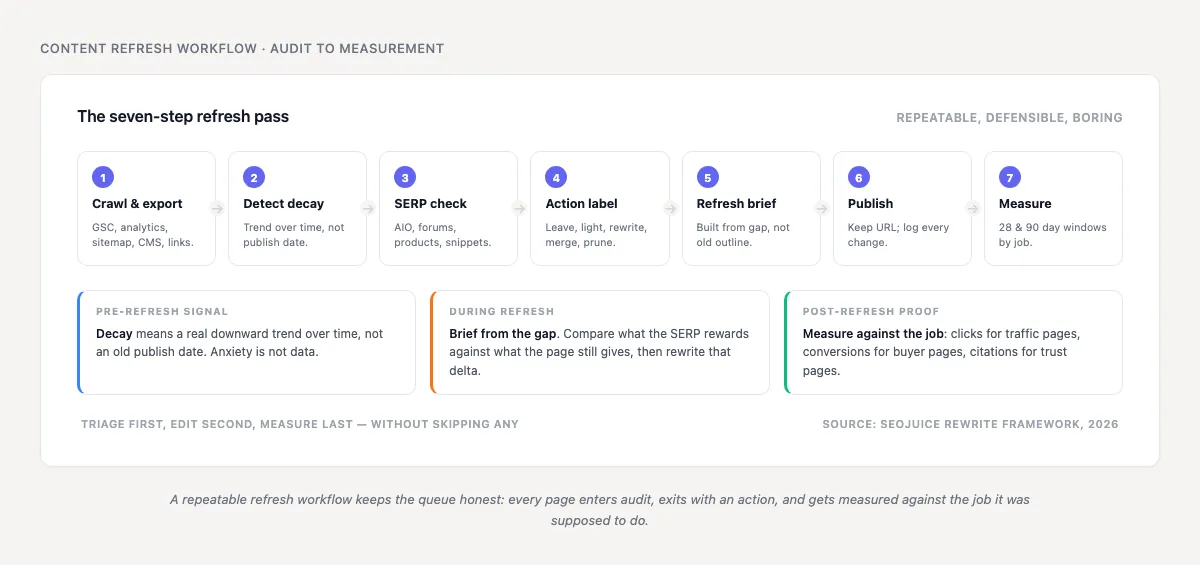
- Export existing URLs from GSC, analytics, CMS, sitemap, and crawl data.
- Pull traffic trend, ranking trend, conversions, backlinks, publish date, last substantial update date, and target query.
- Classify each page by job: acquire, compare, convert, support, trust, or archive.
- Identify decay, not age (decay means trend over time, not birthday).
- Check the current SERP manually for the top candidates.
- Label the action: leave, light refresh, heavy rewrite, merge, redirect, or prune.
- Brief the refresh around the gap, not the old article.
- Update the page with visible substance.
- Keep the URL unless the old URL is wrong or harmful.
- Track performance against the page’s job.
After step eight, do not fake the freshness signals. John Mueller was talking about auto-updating lastmod dates in XML sitemaps when he said this, as reported by Search Engine Journal:
“It’s usually a sign they have a broken sitemap generator setup. It has no positive effect. It’s just a lazy setup.”
That quote is about sitemaps, but the lesson carries over. Faking freshness is paperwork dressed as strategy.
Light refresh
Use a light refresh when the page is mostly right. Update current facts, sharpen the intro, add better examples, improve internal links, and fix the title if CTR is weak. I use this when the page’s answer still holds and the gaps are visible in one reading.
Heavy rewrite
Use a heavy rewrite when the intent is still valuable but the page no longer answers it well. Keep the URL if it has history and links, but rebuild the argument. This is where many teams under-scope the work because “refresh” sounds cheaper than “rewrite.”
Merge
Merge when several weak pages compete for the same query or split the same topic. I have made the wrong call here before: refreshing three thin pages felt safer than choosing one winner, but the merged page was the first version that deserved to rank.
Redirect or prune
Redirect when a page has a better replacement. Prune when the page has no useful job left, no links worth preserving, no demand worth serving, and no reason to exist for users. Use this carefully, especially on sites with messy history.
How to prioritize refreshes without lying to yourself
Do not overcomplicate the math. Score pages so you can compare them, then override the score when business reality demands it.
| Factor | Score 0 | Score 1 | Score 2 |
|---|---|---|---|
| Traffic decay | Stable | Slight decline | Clear decline |
| Ranking upside | No rankability | Page 2 or worse | Positions 4-12 |
| Business value | Low | Medium | High |
| Intent match | Wrong | Partial | Strong |
| AIO click risk | High | Medium | Low |
| Refresh effort | High | Medium | Low |
A page with high business value and clear decay can beat a page with more traffic. A page with a severe AIO click ceiling may still deserve work if it is a trust page, but do not forecast it like a traffic recovery page.
The score should force a conversation. If the team cannot explain why now, the page probably belongs in the backlog.
How to measure whether the refresh worked
Measure against the reason for the refresh. Traffic recovery pages need clicks, impressions, average position, CTR, and non-brand query spread. Conversion pages need demo clicks, signups, assisted conversions, or internal product clicks. Trust pages may need engagement, sales enablement usage, or support deflection.
Use a before-and-after window, but do not worship it
Compare 28 days before and after for a quick read, then 90 days for cleaner signal. Note seasonality, core updates, SERP changes, and tracking changes.
This is where the Animalz example from earlier is useful as a category, not a promise: a real decay-and-recovery pattern should survive more than a lucky week.
Log the actual changes
“Updated content” is useless. “Rewrote intro around AI Overview intent, added first-hand test, replaced 2022 screenshots, merged duplicate FAQ” is useful.
Your future self needs to know what changed. So does anyone reading the performance report three months later.
Decide the next action
If rankings improve but CTR falls, the SERP may be the problem. If impressions rise but conversions do not, intent may be too broad. If nothing moves, the page may need links, a deeper rewrite, or retirement.
A refresh that publishes and disappears from measurement is just a one-off edit with nicer branding.
The content refresh strategy template

Use this as the working brief. Keep it short enough that someone will actually fill it in.
| Field | What to enter |
|---|---|
| URL | Existing page |
| Current job | Acquire, compare, convert, support, trust, archive |
| Primary query | Main query or query cluster |
| Current trend | Growing, flat, decaying |
| SERP change | AIO, forums, product pages, snippets, new competitors |
| Problem | Intent drift, stale facts, weak proof, thin answer, cannibalization |
| Action | Leave, light refresh, rewrite, merge, redirect, prune |
| Evidence to add | Data, screenshots, first-hand notes, expert review |
| Success metric | Clicks, rankings, conversions, citations, assisted revenue |
| Review date | When to check again |
The most important field is “Problem.” If you cannot fill it in, you do not have a refresh brief. You have a task.
Example: a page at /blog/programmatic-seo-quality-control/ might be a trust page with flat traffic, new AIO presence, weak first-hand proof, and a rewrite action. The evidence to add would be QA screenshots, failed page examples, and internal linking checks from the current workflow; the success metric would be assisted signups and citations, not only clicks.
Final rule: refresh for usefulness, not freshness
A content refresh strategy is about keeping useful pages useful. Some old pages need one better paragraph. Some need a full rewrite. Some need a redirect. Some need silence.
The page I most regret refreshing was not a failure because the edits were bad. It failed because I knew the SERP had moved and refreshed it anyway, hoping effort would change the ceiling. It did not.
The best refresh strategy is the one that makes fewer, better updates and can explain why each one was worth doing.
FAQ
How often should I refresh content for SEO?
Do not set one universal schedule. Review high-value pages quarterly, decaying pages monthly, and stable low-risk pages less often. The trigger should be decay, intent drift, product change, or evidence change.
Should I change the publish date after a refresh?
Only if the content substantially changed. If you rewrote sections, updated evidence, replaced screenshots, and improved the answer, a new updated date is honest. If you changed two sentences, leave it alone.
Is a content refresh better than publishing new content?
Sometimes. A decaying page with links, history, and business value can beat a new post. But if the old URL targets the wrong intent or has no useful job left, new content or consolidation may be cleaner.
How do AI Overviews affect refresh strategy?
They lower the traffic ceiling for some informational queries. For AIO-heavy SERPs, measure citation value, brand memory, assisted conversions, and next-click behavior instead of pretending the old click curve still applies.
What is the biggest mistake in content refreshing?
Refreshing because a post is old. Age can trigger review, but it should not trigger work by itself.
Build a refresh queue you can defend
If your content library has more “update this” tasks than actual briefs, start with the triage model above. SEOJuice can help you turn decay, internal links, cannibalization, and business value into a refresh queue that makes sense before anyone opens the CMS.
Read More
- Why Manual SEO Is Quietly Bleeding Your Agency Margin
- 15 Time-Saving SEO Tips for Freelancers
- 10 On-Site SEO Elements That Influence Rankings in 2026 (Priority Order)
- Internal Linking Statistics 2026: 35+ Data Points (Without the Magic Link Count)
- SEO Statistics 2026: What We Learned Crawling the Web
no credit card required