Topic Clusters for SEO: Structure, Not Magic Topical Authority

TL;DR: Topic clusters are not an SEO cheat code. They work when they make a site easier to understand, easier to crawl, and easier to cite — they fail when they become a pillar-page ritual with 40 thin articles orbiting one bloated guide.
Contrarian opener and core angle
Most people searching for topic clusters seo think they need a new content model. They usually need a cleaner internal linking strategy.
I have built content systems for client sites through mindnow (my dev agency), for vadimkravcenko.com, and now for seojuice.com. The pattern keeps repeating. The cluster diagram looks tidy in Miro. The site itself is a mess. Pages compete. Anchors repeat. The pillar page gets every link. The useful supporting pages sit two clicks too deep.
John Mueller is a useful gut-check here. When asked about topical authority as if it were a formal thing to chase, his answer was short:
“Don’t worry about it.”
That Mueller quote should not be read as “ignore structure.” It means the cluster itself is not the ranking signal. The work behind it is.
Topic clusters still matter in 2026, but not because Google rewards a hub-and-spoke shape. They matter because they force decisions: which page owns which intent, which pages deserve internal links, which anchors explain meaning, and which parts of a subject are deep enough to be retrieved by search and AI systems.

What the top 3 SERP results say, and what they miss
| Result | What it gets right | What it misses |
|---|---|---|
| Semrush, “Topic Clusters for SEO: What They Are & How to Create...” | Clear beginner definition. Explains pillar pages, cluster pages, keyword research, and the standard workflow. | Treats the model too cleanly. It does not push hard enough on cannibalization, thin pages, repeated anchors, or the belief that the diagram creates authority. |
| seoClarity, “SEO Topic Clusters: What They Are & How to Create Them” | Frames topic clustering as a strategic way to organize related content around a central theme. Strong enterprise angle. | Over-indexes on process and platform thinking. Most small sites do not need 60 pages in a cluster. They need six pages with clear ownership. |
| Moz, “SEO Topic Clusters: Complete Guide, Examples & Free...” | Gives templates and a repeatable workflow. Useful for content teams building from scratch. | The template-first framing can hide the strategic question: should this cluster exist at all? It also needs a stronger 2026 update on AI Overviews and changing click economics. |
The gap is not “what is a topic cluster.” The SERP already answers that. The harder question is when a cluster improves site structure, and when it becomes content sprawl with a nicer name.
Topic clusters are structure, not magic topical authority
A topic cluster gives your content a cleaner shape. That is the promise. Not a hidden authority badge. Not a shortcut around weak content. Just a better way to make related pages explain each other.
The terms are simple. A pillar page covers the broad subject. Cluster pages cover specific subtopics. Internal links connect them so users and crawlers can move through the subject without guessing.
The goal is not a perfect hub. The goal is that every page’s job becomes obvious. A crawler should be able to infer the relationship between the broad page and the deep page. A reader should be able to follow the same path without feeling like the links were added after publication by someone meeting a quota.
The old diagram is too simple
The classic model shows one pillar in the middle and a ring of supporting posts around it. Nice slide. Bad representation of most sites.
Real sites have overlapping products, mixed search intent, comparison pages, support docs, glossary entries, old blog posts, and random legacy URLs with links from five years ago. A clean topic cluster map can hide a messy crawl path — and the crawl path is what actually gets experienced.
I have seen clusters where every supporting article linked to the pillar with the same exact-match anchor. None linked to each other. None linked to the product page. Three answered the same question with slightly different titles. On paper, that was a cluster. In search, it was ambiguity.
The better question
Use this test: “If I removed the cluster label, would the internal links still make sense?”
If the answer is no, the cluster is decoration. A real cluster survives without the label because the relationships between pages are useful on their own.
Why the topic cluster model became famous
The idea spread because the original mechanism was real. Anum Hussain, who ran the early HubSpot experiments that became the topic cluster framework, summarized the finding this way:
“The more links to related content we had across our site, the better we ranked.”
That line from Hussain’s “Topics Over Keywords” work matters because the model did not start as a random content template. It came from a restructuring experiment. After HubSpot reorganized content into topic clusters with deliberate interlinking, weekly organic sessions reportedly grew about 13% week over week, and clicks from SERPs for one target keyword rose more than 1,500%.
That is why the model spread. Those numbers were hard to ignore.
Now the caveat. This was a specific experiment on a specific site with strong brand demand, a large content base, and enough authority for internal restructuring to matter fast. A small B2B SaaS blog with 19 posts should not expect the same curve because it draws circles in a spreadsheet.
The mechanism was real
The real mechanism was better content grouping, stronger internal links, clearer anchors, and fewer orphaned pages. The phrase “topic cluster” was branding around that work.
That distinction matters because the useful part is still useful. Related content should link. Deep pages should not sit alone. Broad pages should send readers into depth. Search engines still need paths and context.
The myth came later
The myth was that every topic needs one giant pillar and a fixed number of supporting posts. That thinking creates filler. Filler does not become strategy because it sits in a cluster.
I used to approve too many “supporting” posts because the map looked incomplete (I was wrong about this for years). The better move is often to merge two weak pages and improve the links from the surviving one.
When topic clusters help SEO
A cluster helps when it reduces ambiguity. It hurts when it multiplies pages without adding intent coverage.

- You have multiple pages ranking for similar terms, but none rank well.
- Your strongest guide has no contextual links to deeper pages.
- Your supporting posts answer real questions but receive no internal links.
- Your anchors repeat the same exact-match phrase everywhere.
- Your product or service pages are disconnected from educational content.
- Your topic has sub-intents that deserve separate pages.
The first case is cannibalization. If three pages all target “topic clusters SEO” from slightly different angles, none may have enough clarity to win. The fix is boring — choose one owner, merge the overlap, and redirect or repurpose the rest.
The second and third cases are internal link failures. A strong guide without links to deeper pages becomes a dead end. A useful support article without links pointing at it becomes an orphan candidate. That is where an internal link audit usually finds quick wins.
The fourth case is anchor fatigue. If every link says “topic clusters SEO,” you are not adding meaning. You are repeating a label. Better anchors describe the reason for the click: planning internal links by topic, grouping related SEO pages, or deciding which page owns the broader guide.
The fifth case is business leakage. Educational content often earns the first visit, but the product page earns the conversion. If the two never connect, the cluster is doing publishing work but not business work.
The sixth case is the only one that truly justifies new pages. A sub-intent deserves a page when the searcher has a distinct job.
The intent test
Before creating a cluster page, ask whether the searcher needs a separate answer. “Topic clusters SEO examples” may deserve its own page. “What are topic clusters” may belong inside the main guide if the site is small.
The page should exist only if it can satisfy a distinct searcher job. If it repeats the parent page with a new title, merge it (and usually should stay inside the parent).
The business test
A cluster should have a path to revenue, not only traffic. For seojuice.com, internal linking topics should connect back to actual pain: orphan pages, anchor text, crawl paths, and content decay.
For vadimkravcenko.com, the same model looks different. There, the point is personal authority and repeat readers, not product signup. Same structure. Different business job.
The depth test
A page deserves to exist when it can say something specific that the parent page cannot cover well. If the best version of the page is three paragraphs and a recycled definition, it should probably be a section.
How to build a topic cluster that does not create content bloat
Start from existing URLs, not keywords. Most teams already have the raw material. They just have not assigned ownership.
Step 1: Pick the parent topic
Choose a subject with business value and enough depth. For this article’s silo, the parent topic is internal linking. Topic clusters sit beside it because they are one way of deciding which pages should link to which other pages.
A parent topic like “SEO” is too broad for most sites. “Internal linking” is specific enough to own, explain, and connect to product pain.
Step 2: Map existing pages before writing new ones
Create three buckets: keep, merge, and create.
- Keep pages with distinct intent and useful search demand.
- Merge pages that compete or repeat each other.
- Create pages only where the cluster has a real missing facet.
This is where many teams resist. Creating feels like progress. Merging feels like cleanup. But old URLs are usually where the fastest cluster gains sit.
Step 3: Assign one primary intent per page
Every page needs a job. The pillar page should organize the subject. It should not try to rank for every subquery. Supporting pages should answer deeper questions without becoming mini-pillars.
If no one can state the job of a URL in one sentence, the page probably has an ownership problem.
Step 4: Write internal links before the content brief is final
This is where most cluster plans fail. They write the article, publish it, and then add generic links afterward. Decide the link paths in the brief instead.
Which page links up for context? Which page links across for the next natural question? Which product or service page belongs in the path? This is also where tools like SEOJuice can help spot weak paths and orphan candidates without turning the editorial decision into automation.
Step 5: Vary anchor text without getting cute
Cyrus Shepard’s Zyppy internal links study analyzed 23 million internal links across 1,800 sites and found that varied anchor text was a stronger predictor of traffic than raw link count. The reported benefit rose up to roughly 10 internal links, with diminishing returns beyond that.

That study is correlational (not a controlled industry law), so do not turn it into a fake rule. The takeaway is simpler: do not link to the pillar 40 times with the same phrase.
Use natural, descriptive anchors that reflect the sentence around the link. A page about anchor text for internal links can be linked with “descriptive anchors,” “internal anchor variation,” or “how anchor text explains the destination,” depending on context.
Step 6: Add links where a reader would actually click
A link in a relevant paragraph beats a link dumped at the bottom under “related posts.” The cluster should feel like editorial judgment, not plumbing.
Bottom modules can help discovery. They should not carry the whole strategy. If the only path between two pages is a generic related-post block, the relationship is probably weak.
The 2026 AI search problem changes the ROI
Pew Research found that when an AI Overview appears, users click a traditional result about 8% of the time, compared with 15% on pages without an AI summary. Links inside the AI summary itself get clicked about 1% of the time.
That Pew Research finding changes the promise. A cluster built to capture 30 long-tail keywords may now capture 30 impressions that never become visits. That does not make clusters dead — it changes what success looks like.

Clusters still help retrieval
Aleyda Solis frames the modern version well in her AI Search Content Optimization Checklist:
“Use a topic cluster model, creating a comprehensive pillar (hub) page for your business, relevant, main broader topics, and cluster pages around specific facets.”
This is the better 2026 argument. Systems that break a query into sub-questions need specific, well-structured passages to retrieve. A giant pillar page can be too broad. Thin cluster pages can be too weak. The useful middle is a set of focused pages that answer one facet well and link back to broader context.
Measure more than clicks
Track assisted conversions, branded search lift, cited pages, impressions by query class, and internal path movement. Click-only reporting is now incomplete (in 2026, this is no longer enough).
I do not have a clean metric yet for how often our pages appear inside AI answers versus near them. The tools disagree, the answers shift, and the same query can behave differently tomorrow. But pretending clicks are the only outcome is already wrong.
The new cluster goal
The goal is not “rank every spoke.” The goal is to become the clearest source for the parts of a subject your business should own.
A simple topic cluster template for internal linking
| Field | What to decide | Bad answer | Better answer |
|---|---|---|---|
| Parent topic | What broad subject owns the cluster? | SEO | Internal linking |
| Pillar page | Which URL explains the whole subject? | Latest blog post | Evergreen guide |
| Cluster page | Which sub-intent deserves its own page? | More SEO tips | Anchor text for internal links |
| Link up | Where does the page point for context? | Homepage | Pillar guide |
| Link across | What related page helps next? | Random popular post | Closely related subtopic |
| Link down | Where should the pillar send readers? | Every post | The most useful next step |
| Anchor rule | How will anchors vary? | Same exact phrase | Natural variants by context |
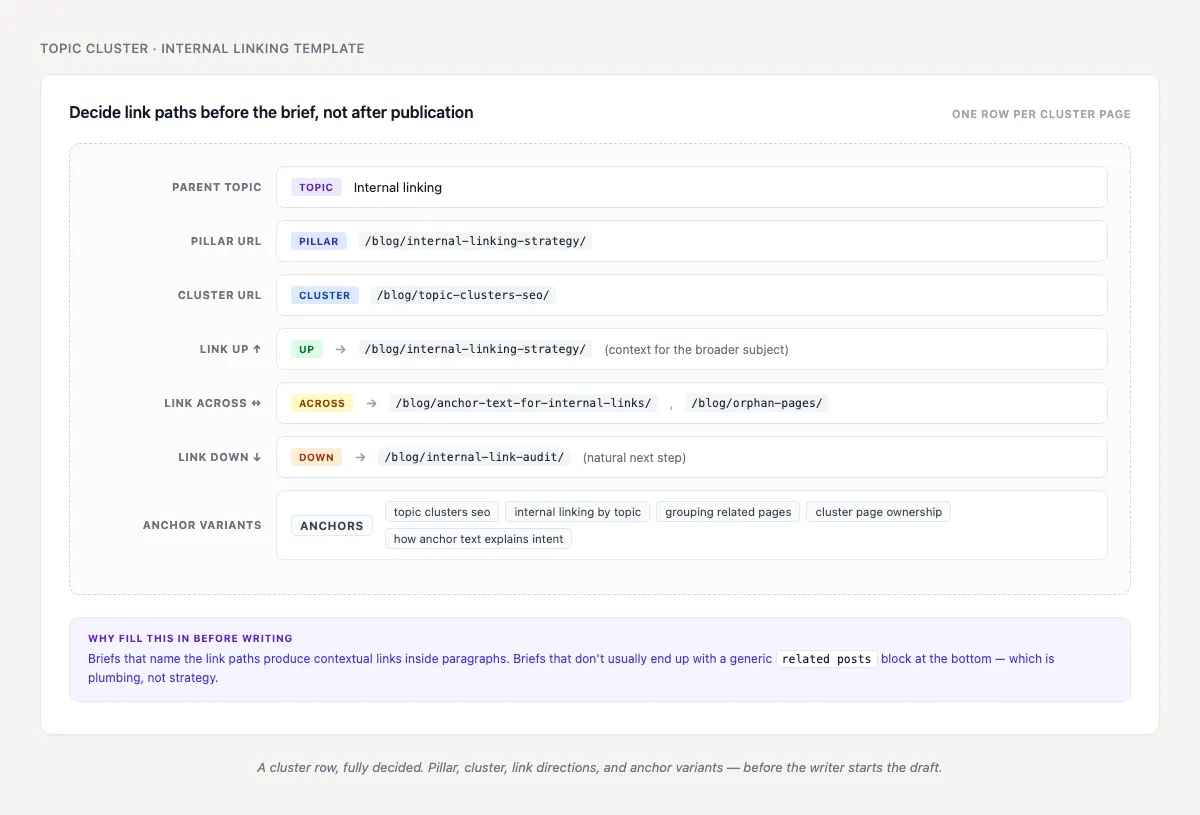
Example cluster for this silo
For seojuice.com, the pillar would be internal linking strategy.
The cluster pages could include orphan pages, anchor text, crawl depth, contextual links, topic clusters SEO, internal link audits, and link equity distribution.
This article, better-structure-with-topic-clusters, should not sit alone. It should link up to the internal linking pillar, across to anchor text and orphan-page cleanup, and sideways to any future guide on content hubs.
The minimum viable cluster
For a smaller site, three to five pages can be enough. A tight cluster beats a huge one if every page has a reason to exist.
Minimum viable cluster work looks like this: one broad guide, two or three deep pages, clear anchors, and no orphaned support content. Painfully boring, but useful.
Common topic cluster mistakes
Building the pillar first and never linking back
The pillar gets polished. The cluster pages get forgotten. That is backwards because supporting pages often answer the specific queries that bring in qualified visitors.
Creating pages for keywords, not intent
If two keywords express the same need, one page may be enough. Splitting them can create cannibalization. The keyword list is input. Intent decides the URL.
Treating the pillar page as a dumping ground
A pillar is not a 9,000-word attic. It should organize the subject and send readers to deeper pages when depth would slow the main guide down.
Linking every page to every other page
That is noise, not a cluster. Links need editorial reason. If a reader would not click the link in that sentence, the link probably does not belong there.
Ignoring old content
Most cluster wins come from fixing existing URLs, not publishing ten new posts. This is especially true on sites with years of blog history.
Verdict: use topic clusters as a maintenance system
Topic clusters are still useful. The old pitch is not.
Do not build them to chase topical authority as a magic label. Build them because they force a site to answer hard questions about ownership, depth, and internal links.
The best cluster work usually feels like maintenance. Merge two weak pages. Add five contextual links. Rewrite anchors. Pull an orphan page closer to the pillar. Remove a post from the plan because it adds no new intent. No launch party. Better structure.
If your cluster map does not change what you merge, what you link to, and what you stop publishing — it is a drawing, not strategy.
FAQ
Are topic clusters still good for SEO?
Yes, when they improve structure. I would not build them just because a template says every pillar needs ten spokes. Build them when they clarify intent ownership, internal links, and content depth.
How many pages should a topic cluster have?
There is no fixed number. A small site may need three to five pages. A large site may need dozens. The better question is whether each page covers a distinct searcher job.
Do I need a pillar page for every cluster?
Usually, yes, but the pillar does not need to be huge. It needs to explain the broad topic, route readers to deeper pages, and make the cluster easy to navigate.
Can topic clusters cause keyword cannibalization?
Yes. Clusters can make cannibalization worse when teams create separate pages for keywords that share the same intent. Map intent before approving new URLs.
How do AI Overviews affect topic clusters?
AI Overviews reduce click volume for some searches, so clusters should not be judged only by long-tail traffic. They can still help retrieval, citations, branded visibility, and assisted conversions.
Clean up your internal links before you publish another cluster
If your next topic cluster starts with a spreadsheet, pause. Audit the URLs you already have, find the orphaned pages, fix the weak paths, and decide which page owns each intent. SEOJuice is built for that kind of cleanup: less diagram worship, more useful internal links.
Discussion (4 comments)
system_designer
Did you A/B test adding cluster pages + the internal linking or is the lift observational? From an implementation POV I'd validate with crawl-graph exports (Screaming Frog/Sitebulb) and server log analysis to confirm improved crawl depth and reduced orphaned pages — otherwise pillar hubs can just redistribute thin content. Also curious how you handle canonicalization for large clusters.
Michael Rodriguez, SEO Consultant
Good question — we didn’t run a pure A/B test. In my experience leading SEO for enterprise SaaS, a staged rollout across comparable site sections gives cleaner signal. Validate with crawl-graph exports (Screaming Frog/Sitebulb) + server-log analysis to confirm deeper Googlebot crawl and fewer orphaned pages. For canonicals: rel=canonical→pillar for near-duplicates, otherwise canonical=self and consolidate/noindex thin pages. I can share our log-analysis template — what CMS/scale are you on?
Rachel Brown, Marketing Consultant
In my 6 years running content strategy for B2B SaaS, aligning pillar pages and cluster pages to buyer-intent stages — and mapping CTAs on the pillar to high-intent clusters — drove ~30% uplift in organic-assisted conversions. Recommend formalizing topic and intent fields in your CMS so contributors consistently link clusters back to the pillar; I can share our brief/template if useful. Happy to connect and compare approaches.
Anna Lee Digital
Too heavy for family biz
ConversionQueen
tbh topic clusters wrecked my small SaaS blog — building a pillar + a dozen thin cluster pages diluted keywords and traffic until I consolidated. I merged weak cluster pages, used canonicals, and saw rankings recover in weeks. Anyone else think clusters only make sense once you have steady traffic to justify depth?
Read More
- Why Manual SEO Is Quietly Bleeding Your Agency Margin
- 15 Time-Saving SEO Tips for Freelancers
- 10 On-Site SEO Elements That Influence Rankings in 2026 (Priority Order)
- Internal Linking Statistics 2026: 35+ Data Points (Without the Magic Link Count)
- SEO Statistics 2026: What We Learned Crawling the Web
no credit card required