Managing Multiple SEO Clients: The Problem Is Open Loops, Not Client Count

TL;DR: Managing multiple SEO clients looks like a calendar problem, but the real failure sits in contracts, attention, and reporting. If those three are loose, AI tools only help you create chaos faster.
The problem is not multiple clients. It is multiple open loops.

I learned this the expensive way at mindnow and again while building seojuice.com. The calendar looked full, so I thought the business was healthy—it wasn’t. A week can be fully booked and still be bankrupt if every client gets to interrupt every other client’s work.
“Balancing multiple SEO clients” sounds like a personal productivity problem. It sounds like you need a better task manager, a cleaner board, or one more color-coded calendar. That framing is too soft.
The real problem is open loops: unfinished audits, pending approvals, unclear deliverables, Slack pings from one client during another client’s technical review, half-built reports, and calls scattered across the best thinking hours of the day. An open loop is unfinished work with no trusted next action (unfinished tasks with no trusted next action). Enough of them and your brain becomes the project management tool. That always fails.
Client count is rarely the first bottleneck. Open loops are. A consultant with eight calm, well-scoped accounts can have a better week than a consultant with four chaotic retainers.
| Failure mode | What it feels like | Real fix |
|---|---|---|
| Context switching | You worked all day and remember none of it | Client batching |
| Client interruptions | Every client thinks they are the priority | Contracted response rules |
| Scope drift | Retainers become “anything SEO” | Defined deliverables |
The tool is not the system. The contract is. If the client can interrupt six times a day through three channels, your Notion board is just a cleaner record of the damage.
Calculate client capacity before you accept the next retainer.

The simplest capacity formula is this:
weekly client capacity = deep work hours ÷ average delivery hours per client
Do not count meetings, admin, sales calls, learning, invoicing, or internal cleanup as delivery hours. If you have 25 real delivery hours per week and each client takes 4.5 hours, five clients is already a full roster — not a weak one.
This is where many SEO consultants lie to themselves. They count a 40-hour week, subtract nothing, then wonder why ten clients feel impossible. The answer is math. A 40-hour week might contain 22 to 28 hours of delivery work once you remove meetings, reporting, admin, sales, and recovery time.
| Client type | Weekly delivery hours | Reporting/admin hours | Practical solo capacity |
|---|---|---|---|
| Local SEO maintenance | 2-3 | 0.5-1 | 8-12 clients |
| Content-led SEO retainer | 4-6 | 1 | 4-6 clients |
| Technical SEO rebuild | 8-12 | 1-2 | 2-3 clients |
| Full-service SEO account | 10-15 | 2+ | 1-3 clients |
“Ten clients” means nothing without service shape. Ten lightweight local SEO accounts can be sane. Ten accounts with content, technical SEO, dev coordination, analytics cleanup, and stakeholder calls are a trap.
Before accepting the next retainer, ask one blunt question: what must leave the week for this client to enter? If the answer is “nothing,” you are selling capacity you do not have.
Design the week around attention, not tasks.

Managing multiple SEO clients gets hard because SEO work carries context. A crawl issue connects to templates. A ranking drop connects to a content history. A content brief connects to the client’s positioning, product margin, search intent, and internal politics.
You cannot jump between six of those before lunch and expect good decisions.
“When you switch from some Task A to another Task B, your attention doesn't immediately follow - a residue of your attention remains stuck thinking about the original task. This residue gets especially thick if your work on Task A was unbounded and of low intensity before you switched, but even if you finish Task A before moving on, your attention remains divided for a while.”
Cal Newport is describing attention residue, and SEO consultants feel it every day. You open Client A’s Search Console data, then answer Client B’s Slack message, then review Client C’s title tags, then jump back to Client A and wonder why the analysis feels foggy.
Gloria Mark’s research at UC Irvine gives the feeling a number. Interrupted work was resumed after an average of 23 minutes and 15 seconds, and people often completed about two intervening tasks before returning. That means a morning with six client touchpoints is a ruined morning, not a busy one.
Microsoft’s 2025 Work Trend Index adds a modern layer: workers using Microsoft 365 were interrupted every two minutes during core work hours, about 275 times per day, with half of meetings placed between 9-11am and 1-3pm. Those are the hours many people think best. SEO clients bring their own notification culture unless you refuse it upfront.
A workable week protects one constraint: one client per deep-work block—admin later, calls outside peak hours.
- Monday morning: Client A deep work.
- Monday afternoon: reports, inbox, approvals.
- Tuesday morning: Client B deep work.
- Tuesday afternoon: calls and async replies.
- Wednesday morning: Client C or technical sprint.
- Wednesday afternoon: content briefs and review.
- Thursday: production and QA.
- Friday: reporting, planning, cleanup, sales buffer.
The exact days can change. The rule should not. One client per serious thinking block. Admin batched later. Calls pushed out of the hours where you do your best work.
Replace weekly status calls with async reporting.
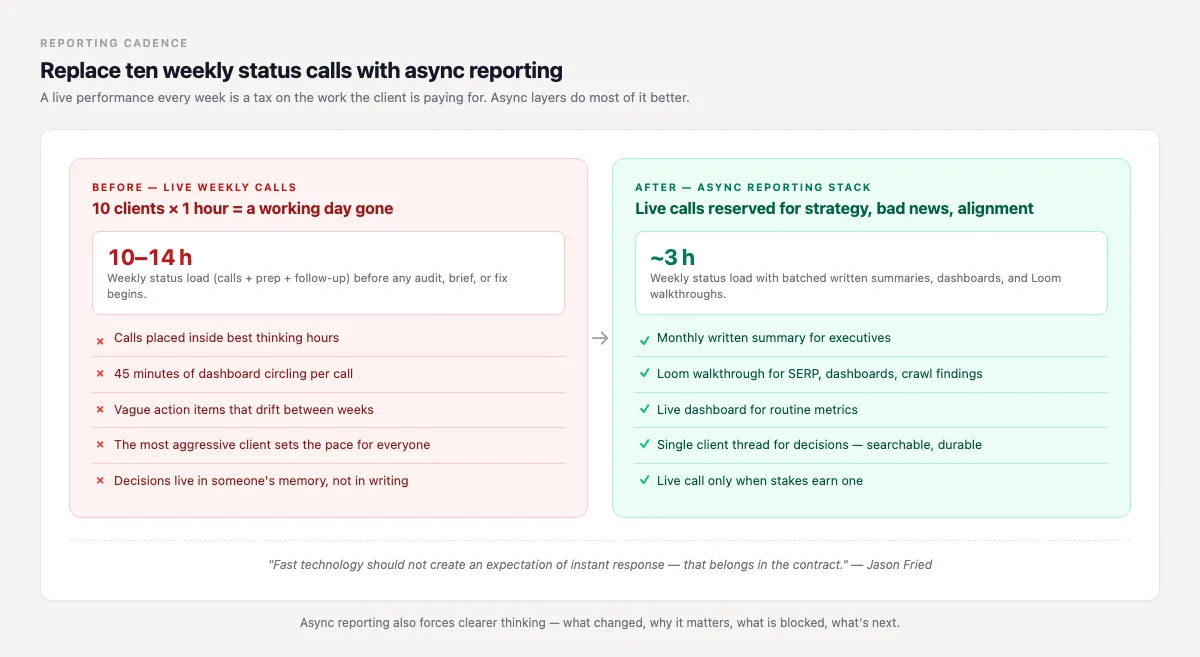
Weekly status calls feel responsible. At scale, they become a tax on the work the client is paying for.
“I can go for three weeks just diving deep on a programming issue and come out after those three weeks and be just energized... but if I try to do three weeks filled with meetings and interruptions, I'm about ready to jump off a bridge.”
David Heinemeier Hansson was talking about programming, but the SEO translation is obvious. Ten clients with one weekly 60-minute call equals ten hours gone before audits, briefs, fixes, internal links, analysis, or implementation. Add prep and follow-up, and one to two working days disappear.
That does not mean clients should be ignored. It means status should move without requiring a live performance every week.
A good async reporting stack has five parts:
- A monthly written summary for executives.
- A Loom walkthrough for visual topics like dashboards, SERP changes, or crawl findings.
- A dashboard for metrics that do not need live commentary.
- A single client thread for decisions.
- A live call only for strategy changes, bad news, or stakeholder alignment.
Jason Fried’s companion point from the same REWORK discussion is useful here: fast technology should not create an expectation of instant response. That belongs in the contract, not in your mood on a tired Thursday.
Async reporting also makes your thinking clearer. A written report forces you to say what changed, why it matters, what is blocked, and what happens next. A live status call lets everyone circle the dashboard for 45 minutes and leave with three vague action items.
Put communication rules in the contract, not in your mood.
If the client can reach you through email, Slack, WhatsApp, phone, project comments, and surprise calendar invites, you do not have a communication system. The client does.
Use plain language in the agreement:
“Email is the source of truth for requests. Slack is for quick clarification only. Standard response time is one business day. Urgent requests must be marked urgent and may affect the delivery calendar.”
This feels rigid until you have ten clients. Then it feels humane. Without explicit norms, the most aggressive client sets the operating rhythm for every other client.
Define these items before work starts:
- Primary channel.
- Response time (one business day, not one hour).
- Meeting cadence.
- Approval deadlines.
- What counts as urgent.
- Where requests are logged.
- How out-of-scope work is priced.
Good clients like this because it tells them how to get good work from you. Bad clients dislike it because it removes the hidden benefit they were getting: free access to your attention.
Standardize deliverables without making the work generic.
Standardizing the workflow does not mean giving every client the same strategy. It means every client moves through the same delivery rails.
A simple monthly delivery model works well:
- Week 1: analysis and prioritization.
- Week 2: production or implementation.
- Week 3: QA, internal links, technical checks, content updates.
- Week 4: reporting and next-month planning.
The rails stay stable. The work changes.
A local SEO client might get Google Business Profile work, local landing pages, citation cleanup, and review strategy. A SaaS client might get technical fixes, comparison pages, content refreshes, and programmatic internal linking. The monthly rhythm can be identical while the strategy is different.
This is where a tool like SEOJuice fits inside the process rather than replacing it. Internal linking and page-level recommendations can be productized, but priority still needs a human decision. A model can suggest that a page needs links. It cannot know that the sales team is pushing one segment this quarter unless you feed it that business context.
Standardization gives you repeatability. Judgment keeps the work from becoming generic.
Use AI to remove admin, not judgment.

The 2026 stack problem is real. A consultant may touch Search Console, GA4, Looker Studio, Screaming Frog, a rank tracker, Slack, email, Notion, Loom, ChatGPT or Claude, a CMS, and a client CRM before lunch.
Asana’s Anatomy of Work data is useful as survey data here: the average knowledge worker switches between 9-10 apps per day, and about 60% of the workday goes to “work about work” rather than skilled work. SEO consultants can exceed that app count before noon.
AI should compress repeatable admin workflows, not pretend to replace expert judgment.
Good AI uses:
- Drafting monthly report summaries from GA4, Search Console, and ranking notes.
- Turning crawl exports into issue clusters.
- Creating first-pass content brief structures.
- Summarizing client calls into decisions and tasks.
- Flagging pages that need internal links, refreshes, or consolidation.
Bad AI uses:
- Publishing content without review.
- Letting a model decide priority without business context.
- Auto-sending reports nobody checked.
- Creating more artifacts than the client can act on.
That last one matters. If AI gives you three more documents per client and no clearer decision path, you did not save time. You taught the chaos to type faster (this is the bit nobody flags in case studies).
AI saves time after the workflow is constrained. Without fixed client blocks, async reporting, and defined deliverables, AI becomes one more tab in a broken week.
Stop selling “as needed” SEO. Sell defined retainers.
Pricing is part of workflow. That sounds strange until you have five clients on “just ping me when you need something” agreements.
“If you charge hourly, you will often end up having weeks that don't kind of cleanly bucket, right? That decreases your effective utilization rate.”
Patrick McKenzie’s point lands hard in SEO. Hourly work creates scraps: 30 minutes here, 45 minutes there, a quick look at a traffic drop, a call that cannot be billed cleanly, a content review squeezed between two audits. You feel busy, but the week has no shape.
I used to think hourly was safer because it protected me from scope creep. I was wrong about this for years. Hourly protects the client from commitment more than it protects the consultant from chaos.
Ongoing SEO should be sold as monthly retainers with defined deliverables and a change process.
A good retainer says:
- What gets delivered each month.
- The meeting cadence.
- The reporting format.
- What happens when priorities change.
- How extra work is priced.
This does not mean every consultant must abandon hourly overnight. Hourly can work for tiny diagnostic tasks, emergency reviews, or a one-off second opinion. It should not be the default for ongoing SEO.
McKenzie’s companion idea from the same conversation is that when time is not blocked and outcomes are not defined, things sprawl. That is exactly what kills managing multiple SEO clients. The work enters the week in pieces too small to protect, even though the total hours look reasonable on paper.
The client dashboard should show decisions, not just metrics.
Most dashboards are graveyards. They show clicks, impressions, rankings, traffic, and conversions, but they do not tell the client what changed, what matters, and what happens next.
A useful SEO dashboard is an operating artifact. It should reduce calls, not decorate them.
| Report section | What it answers |
|---|---|
| Scoreboard | Traffic, conversions, leads, revenue where available. |
| Work completed | Pages shipped, fixes made, briefs written, links added, tests run. |
| Decisions needed | Approvals, tradeoffs, blocked items. |
| Next actions | What happens before the next report. |
| Risks | Algorithm updates, migration issues, dev blockers, content decay. |
Screenshots are less useful than structure. The same report shape every month trains the client where to look. It also trains you to report decisions, not just movement.
If a dashboard does not answer “what should we do next?”, it is analytics wallpaper.
A weekly workflow you can copy.
Here is a concrete version for a consultant with six clients. Adjust the names and hours, but keep the constraint: no more than two client contexts before lunch.
| Day | Morning | Afternoon |
|---|---|---|
| Monday | Client A deep work | Client B deep work |
| Tuesday | Client C deep work | Replies and approvals |
| Wednesday | Client D deep work | Reporting batch |
| Thursday | Client E production | Client F production |
| Friday | QA and internal linking | Dashboards, invoices, next-week planning |
The rules matter more than the calendar:
- No more than two client contexts before lunch.
- No standing weekly calls unless the engagement is high-touch by design.
- No new request enters the week without a delivery tradeoff.
- No dashboard goes out without a written interpretation.
- No client gets instant-response access unless they pay for that access.
This is also where internal linking, page refreshes, and technical cleanup belong. Put recurring SEO maintenance into named blocks. If it stays as “when I have time,” it will lose to the loudest inbox.
What to do when you are already overloaded.
If you are already overloaded, do not rebuild the business in a week. Triage first.
- Pause new work for seven days.
- List every client, monthly fee, expected deliverables, actual hours, meetings, and stress level.
- Identify clients with bad margin or bad communication patterns.
- Convert reporting to async for the lowest-risk clients first.
- Renegotiate or offboard one account.
You do not need a better task manager first. You need one fewer bad retainer.
Side note: I used to treat offboarding as failure. It was often the moment the business stopped lying to itself. A client can be nice and still be a bad fit for the operating model you need.
Start with the account that consumes the most attention per dollar. Not the lowest-fee client by default. The quiet $1,500 local SEO account may be better than the $5,000 stakeholder-heavy account that breaks every week.
Final position: client count is the wrong metric.
Managing multiple SEO clients well comes down to keeping enough attention to make good decisions for each one — never about carrying the biggest roster.
A consultant with six profitable, well-scoped retainers is healthier than one with fourteen clients, twelve dashboards, and no morning deep work—the larger roster only wins on paper.
The mature question is not “How many SEO clients can I handle?” It is “How many clients can I serve without degrading the thinking they are paying for?”
If the week cannot protect attention, the business cannot protect results.
FAQ
How many SEO clients can one consultant handle?
For a solo consultant, the sane range is often 4 to 12 clients depending on service type. Local SEO maintenance can support a larger roster. Technical rebuilds, full-service SEO, and content-heavy retainers cut capacity fast. Use delivery hours, not client count, as the limit.
Should every SEO client have a weekly call?
No. Weekly calls make sense for high-touch accounts, launches, migrations, or sensitive stakeholder work. For most ongoing retainers, a written monthly summary, Loom walkthrough, dashboard, and decision thread can replace routine status calls.
What should go into an SEO retainer?
A good retainer defines monthly deliverables, reporting format, meeting cadence, response time, approval rules, and how extra work is priced. “As needed SEO” creates attention debt because neither side knows what is inside the month.
Can AI help with managing multiple SEO clients?
Yes, but only for the right layer. Use AI for report drafts, crawl clustering, brief structures, call summaries, and internal-link opportunities. Keep humans in charge of priority, quality, strategy, and client tradeoffs.
What is the fastest fix if my client workload is already out of control?
Pause new work, audit every account by fee and actual hours, move low-risk reporting async, and renegotiate or offboard one bad-fit client. The fastest relief often comes from removing one chaotic account, not adding another tool.
Reclaim a morning a week with SEOJuice
If internal linking, page refreshes, and recurring SEO checks keep stealing your deep-work blocks, SEOJuice can turn that maintenance into a repeatable workflow. The goal is simple: reclaim a morning a week so your best attention goes back to strategy, not tab-hopping.
Read More
- Why Manual SEO Is Quietly Bleeding Your Agency Margin
- 15 Time-Saving SEO Tips for Freelancers
- 10 On-Site SEO Elements That Influence Rankings in 2026 (Priority Order)
- Internal Linking Statistics 2026: 35+ Data Points (Without the Magic Link Count)
- SEO Statistics 2026: What We Learned Crawling the Web
14 days free · cancel anytime