Astro SEO: How to Make an Astro Site Rank

TL;DR: Astro gives you a strong SEO foundation because it prerenders static HTML and removes client-side JavaScript by default. Set site in astro.config.mjs, keep indexable content out of client:only components, and configure unique metadata, absolute canonicals, a sitemap, and one consistent URL format. Then inspect the built HTML. A clean component tree does not prove that the deployed page is crawlable.
| Priority | Astro SEO check | Failure mode |
|---|---|---|
| Critical | Set site to the deployed HTTPS URL | Canonicals, sitemaps, RSS links, and social URLs use the wrong origin or fail |
| Critical | Keep important content in rendered HTML | client:only skips server rendering |
| High | Use unique titles and descriptions through a shared layout | Pages ship with missing or duplicated metadata |
| High | Generate absolute canonical URLs | A preview hostname or inconsistent path becomes canonical |
| High | Install @astrojs/sitemap | No sitemap is generated when site is missing |
| Medium | Choose static or on-demand rendering deliberately | Request-time rendering is introduced without a real requirement |
| Medium | Choose a trailing-slash convention | Links, redirects, and canonicals disagree |
| Medium | Add Open Graph, Twitter, and RSS metadata where relevant | Indexing works, but sharing and feed discovery remain incomplete |
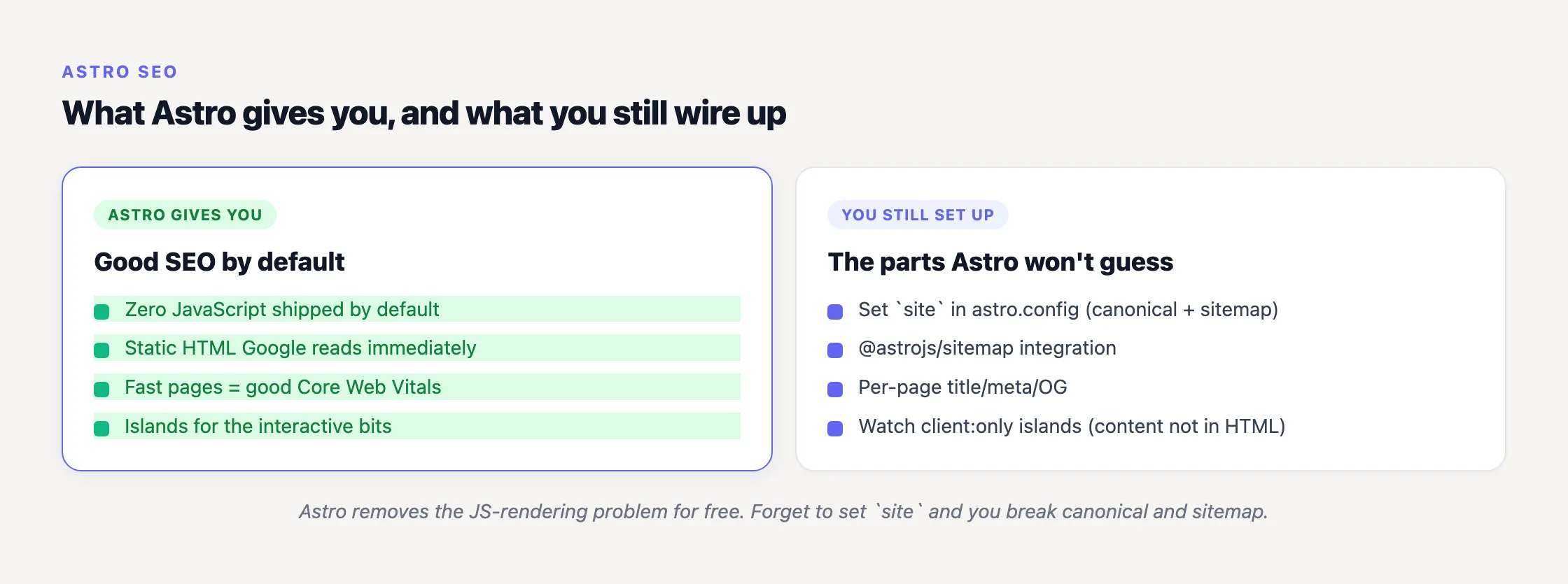
Astro is good for SEO, but it does not do SEO for you
The strongest part of Astro SEO is not an SEO package. It is Astro’s rendering model.
“By default, Astro will automatically render every UI component to just HTML & CSS, stripping out all client-side JavaScript automatically.”
That is Astro’s own description in its Islands architecture documentation. Astro hydrates only the components explicitly marked to run in the browser and leaves the rest of the page as static HTML.
The distinction matters because Google does not treat downloading JavaScript and executing it as the same operation.
“Google processes JavaScript web apps in three main phases: 1. Crawling 2. Rendering 3. Indexing”
Google Search Central further explains that a headless Chromium renders the page once Google’s resources allow. Google can render JavaScript, but content that exists only after execution depends on that additional phase. Astro’s static-HTML default removes that dependency because the meaningful content can already be present in the response. Our JavaScript SEO guide covers the mechanism in more depth.
That is a genuine technical advantage. It is not an automatic ranking advantage. Static HTML cannot rescue thin pages, duplicated titles, weak internal linking, accidental canonicalization, or content nobody needs.
Astro supplies unusually good plumbing. You still have to connect it.
Set the production site URL first
Before adding an SEO component, configure site in astro.config.mjs:
Set it once in your Astro config so canonicals and the sitemap resolve to real URLs:
// astro.config.mjs
import { defineConfig } from 'astro/config';
import sitemap from '@astrojs/sitemap';

export default defineConfig({
  site: 'https://example.com',   // powers canonical URLs and the sitemap
  integrations: [sitemap()],
});| Line | astro.config.mjs |
|---|---|
| 1 | import { defineConfig } from 'astro/config'; |
| 2 | export default defineConfig({ site: 'https://example.com' }); |
Astro’s Configuration Reference defines site as the final deployed URL and says it uses that value to generate sitemap and canonical URLs. The default is undefined, and Astro strongly recommends setting it.
One line controls several systems:
- Astro.site is undefined without it.
- @astrojs/sitemap needs it to generate sitemap URLs.
- @astrojs/rss uses it to create article links.
- Canonical and social-image URLs need it for a dependable production origin.
We saw the mirror image of this dependency during our seojuice.io to seojuice.com migration in January 2026. Canonicals, sitemap entries, Open Graph URLs, and internal references all had to converge on one production origin. A migration makes the problem obvious; a forgotten site value hides the same class of mistake inside an otherwise successful build.
Set the production URL, build, and inspect the output before debugging downstream integrations (one origin, several symptoms).
Build one head component, not dozens of variations
Astro does not ship a special metadata abstraction. Titles and descriptions are ordinary HTML tags. For most sites, the maintainable approach is a shared layout that accepts page-specific values through Astro.props.
| Line | Shared Astro layout |
|---|---|
| 1 | --- |
| 2 | const { title, description } = Astro.props; |
| 3 | --- |
| 4 | <head> |
| 5 | <title>{title}</title> |
| 6 | <meta name="description" content={description} /> |
| 7 | </head> |
The first and third lines are Astro’s frontmatter fences. Each page or content entry should supply its own title and description. A fallback is useful for catching incomplete data, but do not let a site-wide default silently become the metadata for every URL.
I prefer validating required metadata during the build rather than discovering omissions in Search Console weeks later. If a public content page has no title or description, failing the build is often the kinder behavior.
Should you use the astro-seo package?
The community astro-seo package can wrap the common tags. Install it with npm install astro-seo, import SEO from the package, and render the component inside the document head. Its repository lists support for titles, descriptions, canonicals, robots directives, Open Graph, Twitter cards, title templates, language alternates, and custom tags.
Be precise about what it is: astro-seo is a third-party component maintained by jonasmerlin, not an official @astrojs integration. I would use it when its API removes meaningful repetition. For a small marketing site, a local head component is often easier to audit and harder to outgrow (fewer dependencies can be a feature, not an aesthetic preference).
Keep social metadata beside search metadata
Open Graph and Twitter cards are standard meta tags. Generate them in the same shared head component so the page title, description, canonical URL, and image cannot drift independently. Social images should use absolute URLs based on Astro.site; relative paths are a common reason previews work on one service and fail on another.
Generate canonicals from the production origin and current path
Astro exposes the two values needed for a canonical. Astro.site returns a URL based on the configured production site, while Astro.url represents the current request URL.
The official API Reference gives this pattern:
| Line | Canonical implementation |
|---|---|
| 1 | --- |
| 2 | const canonicalURL = new URL(Astro.url.pathname, Astro.site); |
| 3 | --- |
| 4 | <link rel="canonical" href={canonicalURL} /> |
This combines the current path with the production origin, preventing a development or preview hostname from becoming canonical simply because it served the request (preview hosts should not get a vote).
Notice that the pattern uses Astro.url.pathname, not the complete request URL. It therefore drops query parameters. That is normally correct for tracking parameters and ordinary content pages, but not universally. Pagination, filtered collections, and genuinely distinct parameterized pages need an explicit canonical policy.
A canonical is not a generic “SEO enabled” marker. It is a declaration about which URL represents the authoritative version of a page. Inspect the final value.
Make trailing slashes a deliberate decision
Astro’s trailingSlash option defaults to ignore. The always and never settings enforce a form for production on-demand routes, while the default accepts either form in development and on-demand rendering.
For static output, generated files and host behavior also affect the result. Choose one canonical form, generate internal links in that form, and test how the deployed host handles both variants. Changing the Astro setting alone does not guarantee that every static host applies the redirects you expect.
The goal is agreement: internal links, canonicals, sitemap entries, and redirects should all point to the same URL form. Our SEO for developers guide covers the wider implementation discipline behind that decision.
Install the official sitemap integration
Run npx astro add sitemap to install Astro’s official @astrojs/sitemap integration.
According to the official sitemap documentation, the integration needs the deployed site URL, beginning with http:// or https://. Without site, it does not generate a sitemap.
After a build, Astro adds sitemap-index.xml and sitemap-0.xml to the output directory. The index references the numbered sitemap files. The default limit is 45,000 entries per file, after which more numbered files are created (45,000 is a split threshold, not a recommendation to manufacture pages).
Inspect several entries after deployment. Check the protocol, hostname, paths, slash convention, and whether private or utility pages slipped in. Also open the sitemap index and follow its child links. I have seen technically valid sitemap files deployed under paths that nobody tested.
A sitemap helps discovery; it does not force indexing. For the rest of that process, see how Google indexing works.
The Astro island trap is specifically client:only
Astro islands are not inherently bad for SEO. Saying so confuses selective hydration with client-only rendering.
Astro’s directives reference says client:only “skips HTML server rendering, and renders only on the client.” Anything inside that component is absent from the initial server-rendered HTML and depends on JavaScript execution.
Do not place article copy, product descriptions, FAQ answers, primary navigation, internal links, or other indexable content inside client:only. Reserve it for interfaces that cannot render on the server and whose contents do not need to appear in the initial response.
client:load, client:idle, and client:visible are different. They server-render the initial HTML and then control when hydration occurs. The issue is not React, Vue, Svelte, or islands themselves. The issue is skipping server rendering or fetching essential copy exclusively in the browser.
From what we see across sites checked with SEOJuice, the revealing failure on JavaScript-framework builds is often not a missing sitemap. It is a page that looks complete in a browser while its meaningful body copy is missing from the raw HTML response. On Astro, one client:only boundary is an obvious first place to look, though browser-only data fetching can produce the same result.
I have made this mistake by reviewing only the rendered page. More precisely, I reviewed what the browser reconstructed, not what the server returned. Viewing the response source would have ended the investigation much earlier. It is the same app-shell failure discussed in our SPA SEO best practices.
Use static output unless request-time rendering solves a real problem
“By default, your entire Astro site will be prerendered, and static HTML pages will be sent to the browser.”
That comes from Astro’s On-demand rendering guide. The default output: 'static' mode generates pages at build time. It is the straightforward choice for documentation, articles, landing pages, and product content that does not depend on request-specific data.
output: 'server' renders pages on demand and requires an adapter for the target runtime, such as Node, Netlify, Vercel, or Cloudflare. Server rendering can return complete HTML and is not intrinsically worse for SEO. It simply adds runtime infrastructure, latency, and another failure surface. Use it because the page needs it, not because SSR sounds more capable.
You can mix both behaviors. In static mode, export prerender = false from a page that must render on demand. In server mode, export prerender = true for a page that should be generated ahead of time.
Older tutorials may recommend output: 'hybrid'. Astro 5 folded the old hybrid behavior into 'static'; the Astro 5 upgrade guide describes 'hybrid' and 'static' as merged into a single static configuration. Current projects should use static or server with per-page prerender overrides.
Add RSS when the site publishes recurring content
Astro provides the official @astrojs/rss package for feeds generated through API endpoints. Install it with npm install @astrojs/rss, then create an endpoint such as src/pages/rss.xml.js that returns the RSS helper with site: context.site and the feed items.
The Astro RSS documentation requires a configured site because that origin is used to generate article links. This is another reason to treat site as foundational configuration rather than a sitemap-specific option.
Inspect the built site, not just the source components
Astro components can look correct while the deployed output is wrong. Build and deploy, then verify:
- The raw HTML response contains the main content and important links.
- Every indexable page has an appropriate title and meta description.
- The canonical is absolute, uses HTTPS, and points to the production hostname.
- Canonicals, internal links, redirects, and sitemap URLs share one slash convention.
- Open Graph and Twitter images use absolute production URLs.
- sitemap-index.xml exists and references reachable child sitemaps.
- No indexable content exists only inside client:only components.
- Pages intended to be static appear in the generated build output.
- Preview and staging hosts do not emit themselves as canonical.
- Redirects behave as expected on the actual hosting platform.
Use “view source,” fetch the URL without relying on browser execution, and inspect the deployed files. DevTools’ Elements panel shows the post-execution DOM, which is useful but answers a different question (I still catch myself checking the wrong one first).
Astro handles the rendering foundation well. The recurring work is maintaining metadata, internal links, schema, and page consistency as the site grows. SEOJuice can run on Astro through a JavaScript snippet and continuously apply on-site fixes such as internal links, meta titles and descriptions, schema markup, and image alt text. The free SEO audit is also a no-signup way to inspect shipped metadata and canonicals.
It is not a substitute for setting site, generating a sitemap, or keeping indexable content in the initial HTML. Automation should sit on top of a correct build.
Frequently Asked Questions
Is Astro good for SEO?
Yes. Astro prerenders static HTML and strips client-side JavaScript by default, so content can be present in the initial response rather than depending on Google’s deferred JavaScript rendering phase. Ranking still depends on useful content, metadata, internal linking, canonicals, and other implementation choices.
How do I add meta titles and descriptions in Astro?
Add standard title and meta-description tags to a shared layout, then pass unique values through Astro.props for each page. The community astro-seo package is another option, but it is not an official Astro integration.
How do I add a sitemap to an Astro site?
Run npx astro add sitemap and set site to the deployed URL in astro.config.mjs. A build then emits sitemap-index.xml and sitemap-0.xml. Without the site configuration, the integration cannot generate the sitemap.
How do I set canonical URLs in Astro?
Use Astro’s documented pattern: create a URL with new URL(Astro.url.pathname, Astro.site), then output that value in a canonical link tag. Configure site first because Astro.site is otherwise undefined.
What is the difference between static and SSR output in Astro?
output: 'static' is the default and prerenders pages to HTML at build time. output: 'server' renders on demand and requires an adapter. You can mix behavior per page with prerender = false in static mode or prerender = true in server mode.
Why is my Astro sitemap or canonical URL not working?
Check site first. It is undefined by default, while sitemap generation, Astro.site, canonical construction, RSS article links, and many absolute social URLs depend on it. Set it to the final HTTPS origin, rebuild, and inspect the generated output.
Read More
- Why Manual SEO Is Quietly Bleeding Your Agency Margin
- 15 Time-Saving SEO Tips for Freelancers
- 10 On-Site SEO Elements That Influence Rankings in 2026 (Priority Order)
- Internal Linking Statistics 2026: 35+ Data Points (Without the Magic Link Count)
- SEO Statistics 2026: What We Learned Crawling the Web
14 days free · cancel anytime