SEO for Developers: What Actually Matters in the Code

TL;DR: SEO for developers is the structural part of SEO that ships with the code: HTTP responses, initial HTML, links, metadata, crawl directives, URLs, structured data, and performance. The goal is to remove every mechanical reason a crawler might fail to access, render, index, or understand a page. None of this substitutes for useful content or authority.
| Area | Common failure | Sensible default |
|---|---|---|
| Rendering | Important content exists only after client-side JavaScript runs | Use SSG, SSR, or hydration for public content pages |
| Status codes | Soft 404s, permanent 302s, intermittent 5xx responses | Make the response status describe the actual result |
| Crawl controls | Using robots.txt to hide a URL from search | Use robots.txt for crawling and noindex for index control |
| HTML | Clickable divs, repeated titles, ambiguous document structure | Ship semantic HTML and real links |
| URLs | Hash routes, unstable slugs, duplicate parameter variants | Use stable paths and consistent canonicals |
| Performance | Slow LCP, long JavaScript tasks, layout shifts | Measure LCP, INP, and CLS with field data |
The part of SEO that belongs in the repository
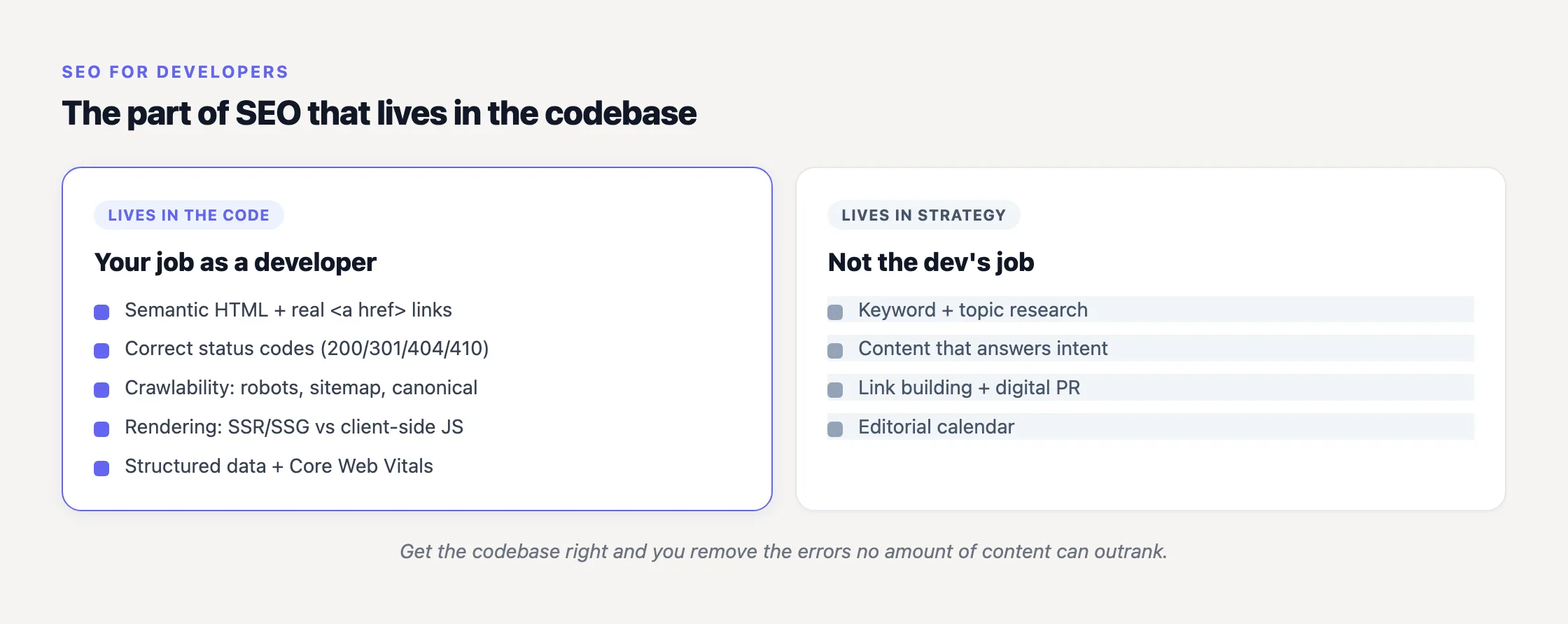
I call this the 20% of SEO that developers own (a prioritization heuristic, not an industry statistic). Keyword selection, editorial quality, backlinks, and brand demand mostly happen outside the repository. No React component can manufacture them.
Developers do control what the crawler receives: the status code, initial HTML, links, title, canonical, indexing directives, schema, and runtime behavior. If those are wrong, useful content can remain undiscovered or be interpreted as a duplicate. If they are right, the content still has to deserve visibility. You have removed the technical veto, not secured a ranking.
The useful model is four gates: crawlable, renderable, indexable, understandable. A URL must pass through them in roughly that order. Our guide to what crawling means in SEO covers the first gate in more detail.
I distrust promises that a framework, schema type, or perfect audit score will produce a predictable ranking increase. Our January 2026 migration from seojuice.io to seojuice.com reinforced the less exciting lesson: accurate redirects, matching canonicals, updated internal links, and observable production responses matter more than migration theories. We treated the old-to-new URL map as something testable, not a spreadsheet to archive after launch.
Start with the HTTP response
A polished component returning the wrong status is still the wrong page. Check the response before opening DevTools.
According to Google Search Central’s documentation on HTTP status codes, a 301 is a “strong signal” that its redirect target should be processed. A 302 is a “weak signal.” Use 301 for a permanent move and 302 only where the move is genuinely temporary.
A missing route must return a real 404 from the server or edge. Rendering a friendly “not found” component while returning 200 creates a soft 404: the transport layer says valid content exists while the body says it does not. The error page can look excellent and still be technically false.
A 410 explicitly says that content is gone, but there is little practical reason to obsess over 404 versus 410 for ordinary removal. Google treats both as absent content. A correct 404 is enough.
Reliability matters too. Google says 5xx and 429 responses cause its crawlers to slow down temporarily, while content returned with a 5xx status is ignored. An intermittent application failure is therefore not only an availability problem. It can reduce crawling precisely while new or updated pages need to be fetched.
Put these assertions into integration tests:
- A valid public route returns 200.
- A permanently moved URL returns 301 to the closest relevant replacement.
- A temporary redirect uses 302 intentionally, not because it was the framework default.
- An unknown route returns 404 before hydration.
- An application exception does not fall through to a branded 200 response.
- A redirect reaches its final destination without chains or loops.
A 200 response does not guarantee indexing. It only moves the document to Google’s next processing step. That distinction is central to how Google indexing works.
Ship meaningful HTML in the first response
This is the largest developer-specific SEO risk. A JavaScript application can look complete in a browser while its initial response contains little more than an empty root element and bundle references.
These are the tags SEO actually lives in, and they belong in the server's first response:
<head>
  <title>Blue Widget - Acme</title>
  <link rel="canonical" href="https://example.com/blue-widget/">
  <link rel="alternate" hreflang="de" href="https://example.com/de/blue-widget/">
  <meta name="robots" content="index,follow">
</head>
Google Search Central explains that pages returning 200 are queued for rendering. A page may remain in that queue for seconds or longer before a headless Chromium executes its JavaScript. Google then uses the rendered HTML for indexing.
Googlebot can execute modern JavaScript. The architectural question is not simply “Can Google run this?” It is “Why require a crawler to download, execute, call an API, and update the DOM before it can discover the primary heading?” Every extra dependency creates another failure point.
“Server-side rendering is a popular choice for delivering a ‘complete looking’ experience that crawlers can interpret.”
That recommendation comes from Google Chrome engineers Addy Osmani and Jason Miller in Rendering on the Web. They also note that growing client-side JavaScript can affect INP, connecting rendering architecture to user responsiveness rather than treating SSR as crawler theatre.
My default is static generation for content that changes infrequently, server-side rendering for request-dependent pages, and hydration or selective client components for interaction. Google’s guidance on dynamic rendering is equally direct: dynamic rendering was a workaround, not a long-term solution; Google recommends server-side rendering, static rendering, or hydration instead.
Pure client rendering is not automatically fatal. Google may process it successfully. But “Google can eventually render this” is a weaker engineering guarantee than “the content arrived in the response” (more precisely, it is a hope backed by another execution pipeline). Many non-Google crawlers and preview tools also do not consistently execute JavaScript.
SPA failures worth testing
- Blank initial HTML: Fetch the route without executing JavaScript. The primary heading, useful copy, and important links should already be present.
- Fake links: Navigation should use anchors with href attributes. A div with a click handler is an action target, not a dependable crawl path.
- Hash routing: Avoid routes such as /#/pricing. Use stable paths and make each route resolvable by the server.
- Shared metadata: Give every indexable route its own descriptive title, canonical, and relevant metadata, preferably in the server response.
- Client-only errors: Missing routes need an HTTP 404, not a 200 response transformed after hydration.
- Interaction-locked content: Do not require a click or arbitrary scrolling to expose essential copy. Infinite lists need crawlable pagination with real URLs.
From what we see across sites on SEOJuice, mundane contradictions recur more often than exotic rendering bugs: a production noindex, a canonical pointing at the wrong host, or links that exist visually but not as anchors. The framework usually works. The final response assembled by the framework, CMS, proxy, and edge configuration is where assumptions collide.
Our JavaScript SEO guide covers the crawl-render-index pipeline in more depth, while SEO for Next.js, React, and Nuxt maps the same tests to framework-level decisions.
Treat crawl controls as separate mechanisms
Robots.txt, noindex, canonicals, and sitemaps are frequently grouped under “indexing settings.” They do different jobs, and combining them carelessly can make the intended instruction impossible for Google to observe.
Robots.txt controls crawler access
Google’s robots.txt documentation says the file tells crawlers which URLs they can access and is used mainly to avoid overloading a site with requests. Its crucial limitation is explicit: it “is not a mechanism for keeping a web page out of Google.” A disallowed URL can still be indexed if other pages link to it.
Use robots.txt to manage crawling, not confidentiality or dependable removal from search.
Noindex controls index inclusion
To keep an accessible page out of Google, send a noindex robots meta directive or an X-Robots-Tag header. Leave the URL crawlable long enough for Google to see that instruction.
This is the trap: if robots.txt blocks the URL, the crawler cannot fetch the page and cannot observe its noindex directive. Google’s noindex documentation specifically says the resource must not be blocked by robots.txt for the rule to be effective.
Canonical identifies a preferred duplicate
A canonical is a strong signal, not an absolute directive. A practical default is a self-referencing canonical on every indexable page. Point it elsewhere only where the current URL is genuinely a duplicate or alternate form of the target.
All signals should agree. Redirecting A to B while declaring A canonical is contradictory. So is listing a parameter URL in the sitemap while canonicalizing it to a clean URL. Google can select a different canonical if your implementation sends mixed messages.
During our domain migration, the useful test was not “Does the canonical component contain the new domain?” It was “For every public old URL, what status, destination, canonical, internal links, and sitemap entry does a crawler actually receive?” That matrix exposed classes of mistakes a template review could not.
A sitemap assists discovery
Google describes a sitemap as a way to identify pages and files you consider important. It does not guarantee crawling or indexing, and a well-linked site can be discovered without one.
Include canonical, indexable URLs that return 200. Exclude redirects, errors, noindex pages, and duplicate parameter variants. A sitemap should describe the clean public site, not mirror every record your database has produced.
Semantic HTML is crawler infrastructure
MDN defines semantics as “the meaning of a piece of code.” A heading element assigns a heading role. A large styled span may look identical but does not express that role. The same distinction applies to an anchor used for navigation and a button used for an action.
My template defaults are deliberately boring:
- One clear page-level h1 as a house rule, not a supposed ranking trick.
- A logical h1, h2, and h3 outline driven by content structure rather than font size.
- Anchors with href attributes for destinations.
- Buttons for actions.
- Useful header, nav, main, article, and footer landmarks.
- A unique, descriptive title and meta description for every indexable route.
MDN’s guidance on semantic HTML connects these choices to accessibility, SEO, and maintainability. That overlap is useful: markup that clearly communicates purpose tends to work better for crawlers, assistive technology, and the developer debugging it six months later.
Keep URLs and machine-readable signals consistent
Prefer readable, lowercase, hyphenated paths and keep them stable. Avoid exposing session IDs, internal state, and unnecessary tracking parameters as crawlable URL variants. If a URL changes permanently, redirect the old path and update internal links to the final destination.
Structured data supplies an explicit machine-readable classification. Google defines structured data as a standardized format for describing a page and recommends JSON-LD where the setup allows it.
Types such as Article, BreadcrumbList, Product, Organization, and WebSite can be useful when they accurately describe visible content. Generate required properties from the same source as the page, then validate the deployed output. Structured data can create eligibility for rich results; it does not guarantee that Google will show them.
International templates require similar consistency. Each hreflang version must reference itself and its alternates, and the references must be bidirectional. Use valid language and optional region codes, plus x-default for a fallback page. I once assumed crawlers would reconcile more inconsistencies than they did (they may, but that is a poor contract to build against).
Performance: measure the current metrics
Core Web Vitals are page-experience signals, not a switch that sends a page up the rankings. Faster thin content does not become more useful. Performance is still developer-owned, measurable, and valuable to users.
| Metric | Good threshold | Typical code-level levers |
|---|---|---|
| LCP | 2.5 seconds or less | Server response time, render-blocking resources, image optimization, hero preloading |
| INP | 200 milliseconds or less | Shorter JavaScript tasks, less main-thread work, smaller client bundles |
| CLS | 0.1 or less | Explicit media dimensions, reserved space, stable font and dynamic-content loading |
web.dev’s Web Vitals documentation defines those thresholds at the 75th percentile of real page loads, segmented across mobile and desktop. One fast Lighthouse run is not representative (a clean local run can flatter almost any application). Use field data to find the routes and device classes where real users receive the slow experience.
Update old dashboards too. INP replaced FID as a Core Web Vital on March 12, 2024. If a performance report still treats FID as the current responsiveness metric, its SEO guidance is stale.
What belongs in CI and release checks
- Request representative routes and assert expected 200, 301, and 404 responses.
- Inspect initial HTML for the title, canonical, robots directive, h1, primary copy, and internal links.
- Verify indexable pages are not disallowed by robots.txt.
- Verify noindex pages remain crawlable so crawlers can observe the directive.
- Check that sitemap URLs return 200 and identify themselves as canonical.
- Test redirects from old hosts and paths through to one final destination.
- Validate generated JSON-LD against the visible page type and required properties.
- Monitor mobile field performance for LCP, INP, and CLS.
- Crawl the deployed site after routing, CMS, proxy, or domain changes.
Run these checks against the public deployment, not only the source template. Middleware, CDN rules, plugins, environment variables, and stale caches can all change the response (and yes, this is why I still verify production after a “metadata-only” release).
At SEOJuice, Lida and I automate the repetitive on-page layer: internal links, meta titles and descriptions, schema markup, and image alt-text. That automation cannot rescue blank initial HTML, incorrect status codes, or a production noindex. If page-by-page hygiene is consuming engineering time, SEOJuice has a free plan with no credit card, while your team keeps control of the architectural decisions only it can make.
Frequently Asked Questions
What parts of SEO do developers actually control?
Developers control HTTP statuses, rendering, semantic HTML, links, crawl directives, canonicals, sitemaps, metadata, structured data, Core Web Vitals, hreflang, and URL behavior. They do not directly control editorial quality, backlinks, or brand authority. Their job is to make useful content crawlable, renderable, indexable, and understandable.
Is JavaScript bad for SEO?
No. Googlebot uses an evergreen Chromium and can execute JavaScript, but rendering is queued and introduces additional dependencies. SSR, SSG, or hydration puts important content and links in the initial response, reducing that failure surface and improving access for crawlers that do not execute JavaScript.
Does robots.txt stop a page from being indexed?
No. Robots.txt controls crawler access, not index inclusion. A blocked URL can still appear in Google if other pages link to it. Use noindex to request removal and leave the URL crawlable so Google can see the directive. Our free robots.txt generator can provide a safe starting structure.
What is the difference between 301 and 302 redirects for SEO?
Google describes a 301 as a strong signal that the redirect target should be processed, while a 302 is a weak signal. Use 301 for permanent moves and 302 only for genuinely temporary redirects.
What Core Web Vitals thresholds should developers target?
Target LCP of 2.5 seconds or less, INP of 200 milliseconds or less, and CLS of 0.1 or less. These “good” thresholds are evaluated at the 75th percentile of field loads across mobile and desktop. INP replaced FID on March 12, 2024.
Why is my single-page application not appearing in Google?
Inspect the initial response first. Common causes include content that exists only after JavaScript execution, navigation without real href links, hash-based routes, repeated metadata, accidental noindex directives, and missing routes that return 200. Fix the response and routing contract before looking for a more exotic explanation.
Read More
- Why Manual SEO Is Quietly Bleeding Your Agency Margin
- 15 Time-Saving SEO Tips for Freelancers
- 10 On-Site SEO Elements That Influence Rankings in 2026 (Priority Order)
- Internal Linking Statistics 2026: 35+ Data Points (Without the Magic Link Count)
- SEO Statistics 2026: What We Learned Crawling the Web
14 days free · cancel anytime