JavaScript SEO: How to Get a JS App Indexed

TL;DR: Google can index JavaScript, but client-side rendering adds a deferred step between crawling and indexing. Put primary content, route-specific metadata, and crawlable links in server-rendered or static HTML. Then use Google Search Console’s URL Inspection Tool to verify the rendered DOM, resources, and JavaScript errors rather than assuming your browser represents what Google received.
If your React, Vue, Angular, or supposedly server-rendered app is missing from Google, stop asking whether Googlebot “supports JavaScript.” It does. The useful question is whether Google can fetch the required resources, execute the application, discover its links, and produce an indexable DOM before anything fails.
| Rendering model | What the server sends | JavaScript SEO risk | Best fit |
|---|---|---|---|
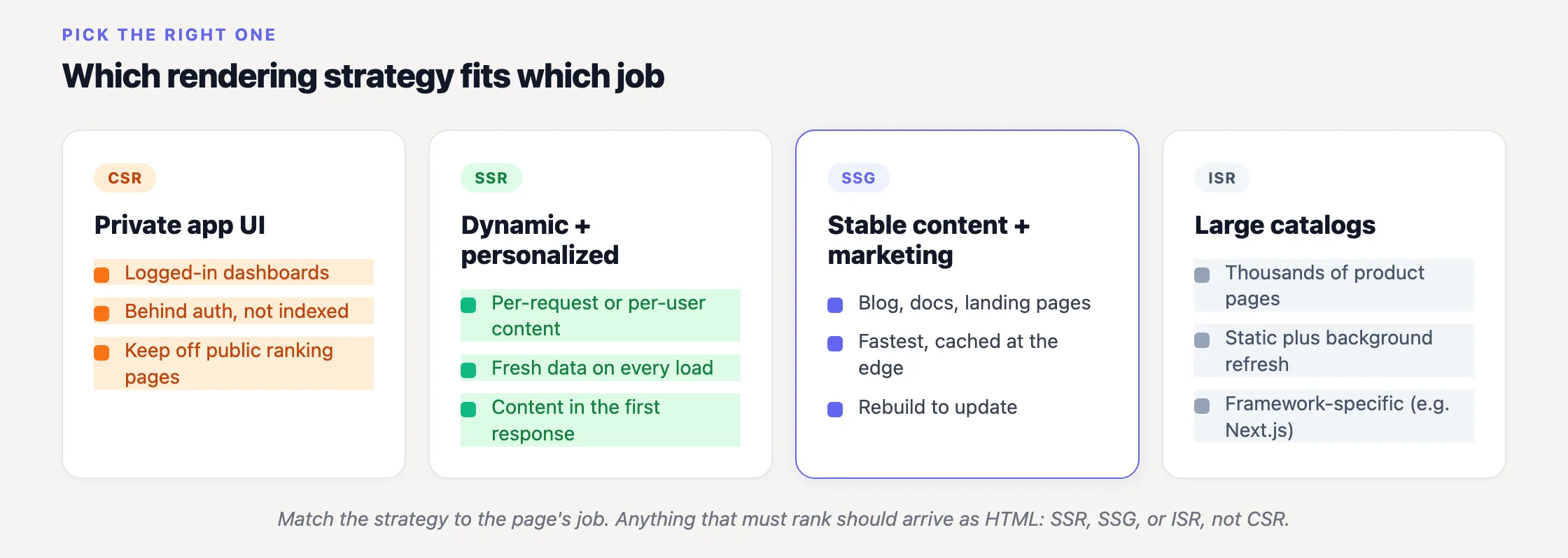
| SSG | Pre-built HTML generated at build time | Lowest. Content is available in the initial response. | Articles, documentation, marketing pages, directories, and relatively stable public content. |
| SSR | HTML generated on the server per request | Low. Crawlers can read primary content without executing JavaScript. | Dynamic public pages that need fresh or request-specific HTML. |
| CSR | A minimal HTML shell plus JavaScript bundles | Highest. Content and links depend on deferred rendering succeeding. | Authenticated dashboards and interactive areas that do not depend on organic search. |
| Dynamic rendering | Different output for bots and users | Operationally complex and no longer recommended by Google. | Legacy systems awaiting an architectural fix, not new implementations. |
The pipeline your JavaScript app must survive
Google Search Central describes JavaScript processing in three distinct phases:
“Google processes JavaScript web apps in three main phases: 1. Crawling 2. Rendering 3. Indexing”
First, Googlebot requests the URL and parses the response. If that response is an almost-empty application shell, Google does not yet have your product copy, article body, headings, client-generated metadata, or route links. It has a URL, some HTML scaffolding, and references to resources.
Google then queues eligible pages for rendering. Its documentation says: “The page may stay on this queue for a few seconds, but it can take longer than that.” This is the accurate model. Avoid the old claim that JavaScript always creates an indexing delay of days or weeks; Google does not say that. There is a deferred queue, however, and your page still has to render successfully once it reaches the front.
That queue is the stage developers tend to mentally omit. The application looks complete in a local browser, while the fetched response may contain little more than a root element and bundle references (view-source is useful here, although it is only half the diagnosis).
During rendering, Google runs the page in a headless browser. Google confirms that “Google Search runs JavaScript with an evergreen version of Chromium.” Modern framework syntax is therefore unlikely to be the problem. Blocked resources, failed API requests, runtime exceptions, interaction-gated content, and poor link markup are better suspects.
After rendering, Google can inspect the resulting DOM and extract URLs added by JavaScript. Those URLs return to the crawl queue. Indexing follows later. Our guides to what crawling means in SEO and how Google indexing works cover the boundaries between those stages.
A client-rendered category page can therefore be known to Google as a URL while its products, descriptions, and outgoing links remain unknown. Discovery is not indexing. An indexed URL is not proof that Google saw the complete page either.
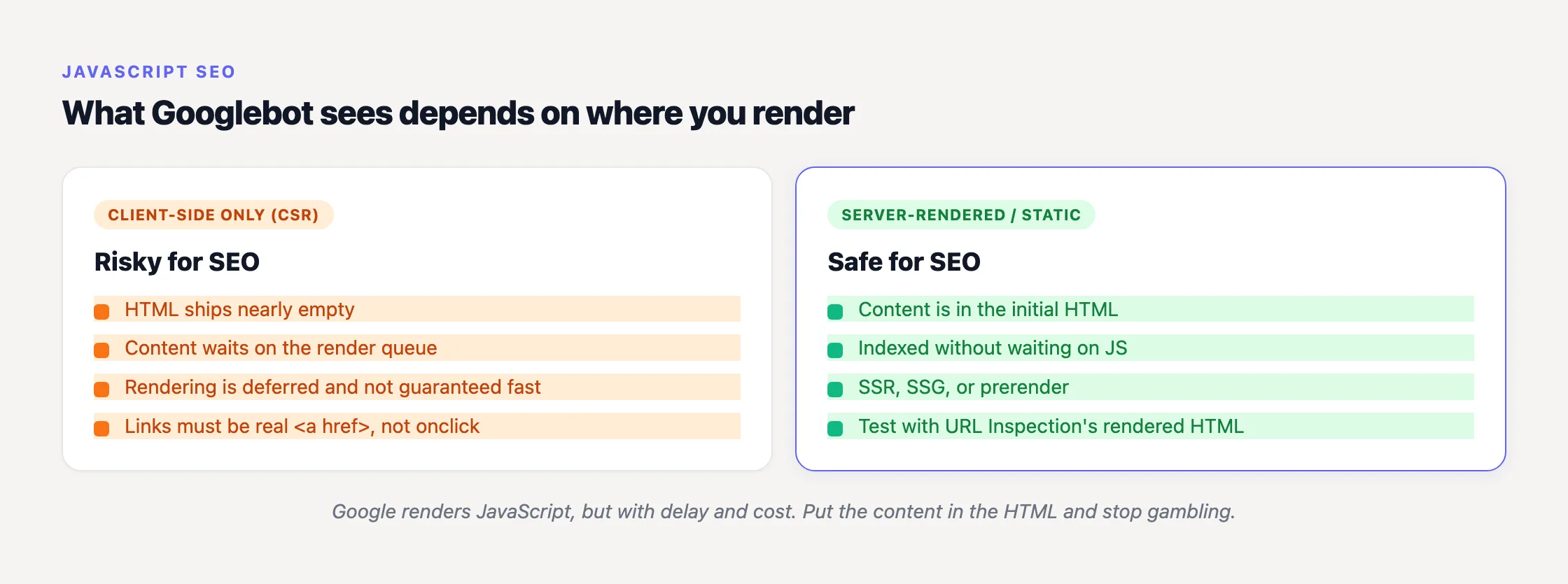
CSR works, but it is a fragile default for pages that must rank
Addy Osmani and Jason Miller define client-side rendering on web.dev as rendering an application in the browser by using JavaScript to modify the DOM. Server-side rendering sends generated HTML from the server. Static rendering creates that HTML at build time. Hydration adds application state and event handlers to HTML that already exists.
The SEO problem with CSR is structural, not ideological. Your important content is absent from the initial response and depends on another system completing more work later. That can function perfectly. I still would not make every public route depend on it when HTML removes an entire class of failure.
“Broadly speaking, we encourage developers to consider server-side rendering or static rendering over a full rehydration approach.”
That is the recommendation from Osmani and Miller, not an instruction to turn every application into a static site. A private analytics dashboard has different requirements from a public marketplace category. Render what needs to rank on the server or at build time, then add client-side interactivity where it earns its cost.
Frameworks provide several routes to this architecture. Our guide to SEO for Next.js, React, and Nuxt covers the framework-specific choices. But an SSR-capable framework does not guarantee server-rendered output. I have assumed it did, only to discover that the useful data was still fetched after mount (the framework logo did not save me).
Do not revive dynamic rendering
Dynamic rendering gives bots a pre-rendered page while users receive the JavaScript application. Google once documented it as a workaround, but its current guidance is explicit:
“Dynamic rendering was a workaround and not a long-term solution for problems with JavaScript-generated content in search engines.”
Google’s dynamic-rendering documentation recommends server-side rendering, static rendering, or hydration instead. That is where I would put engineering time. Bot detection, separate caches, and two possible representations of every page create more opportunities for content and metadata to diverge.
If dynamic rendering already props up a legacy site, do not tear it out without a migration plan. Just do not mistake a tolerated workaround for a sound new architecture.
The JavaScript SEO failures I would check first
1. Primary content exists only after JavaScript executes
Fetch the URL without executing JavaScript. If the response contains an application root, a loading message, and little else, every meaningful element depends on Google’s rendering stage. Move the page’s main text, headings, product records, article body, and essential navigation into SSR or SSG output.
You do not need to remove JavaScript. You need a useful HTML baseline. Keep filters, calculators, account state, and interactive controls on the client where appropriate. The sharper test is: if the main bundle fails, does the response still explain what this URL contains?
Test representative templates, not one convenient URL. A homepage can be static while category pages fetch entirely after mount. Product pages can use SSR while filtered routes return the generic shell. One passing page proves less than most teams want it to prove.
I fix this before polishing metadata. A server-rendered title cannot compensate for an empty article body. Conversely, a complete article is still in trouble if Google receives a permanent loading state. Architecture first.
2. Your “links” are event handlers
This is one of the most common issues we see across sites connected to SEOJuice. A card or menu item invokes a router method, but the markup contains no anchor or destination. It behaves like navigation for a person. It is not a crawlable link.
Google follows real anchors, not click handlers:
<!-- Crawlable: a real link Google can follow -->
<a href="/products/blue-widget/">Blue Widget</a>

<!-- Invisible to crawling: not a link at all -->
<div onclick="navigate('/products/blue-widget/')">Blue Widget</div>
“Google can only discover your links if they are <a> HTML elements with an href attribute.”
That wording comes directly from Google Search Central. Navigable destinations should use real anchors with an href. Your router can still intercept the click and perform client-side navigation; progressive enhancement and SPA behavior are compatible.
The damage compounds. If a listing displays 100 clickable cards as buttons or div elements, that is 100 destinations missing from the link-discovery mechanism Google documents (a sitemap can expose the URLs, but it does not repair their internal-link relationships).
Inspect menus, cards, pagination, breadcrumbs, related-content modules, filters with stable destinations, and logo navigation. If whole route groups are absent from Google, audit links from already-known pages before blaming indexing. Our SPA SEO best-practices guide goes deeper into route discovery and client-side navigation.
3. robots.txt blocks JavaScript, CSS, or API resources
Google states that Search will not render JavaScript from blocked files or on blocked pages. Check broad robots.txt rules for asset paths such as /static/, /_next/, build directories, and proxied API endpoints needed to construct public content.
Inspect the deployed asset URLs rather than trusting repository configuration. A CDN rule, environment-specific robots file, authentication check, or stale deployment path can make production behave differently from local development (production remains annoyingly inventive).
Also confirm that resources return useful responses to Googlebot. A bundle returning 403, an API call failing without a session cookie, or an expired chunk URL can leave the crawler with a blank shell even though robots.txt looks clean.
4. Important content requires interaction
Content fetched only after selecting a tab, pressing “Load more,” triggering a scroll-dependent request, or granting a permission may not appear in the DOM Google indexes. Google’s troubleshooting documentation tells developers to “Expect Googlebot to decline user permission requests.”
Make indexable content available without requiring a user journey. Paginated content should have stable URLs and crawlable links. If a tab contains distinct information worth indexing, include it in the initial HTML or give it a crawlable destination. A crawler should not need to simulate product usage to obtain your primary copy.
5. The router displays a 404 while the server returns 200
An SPA can show a polished “Not found” component for an invalid route while the server reports 200 OK. Google treats this as a soft-404 pattern. Its documented fixes are to redirect to a URL where the server returns a genuine 404, or add or change the robots meta tag to noindex.
I prefer the correct server status wherever the stack permits it. Status codes communicate what happened before the application boots. They are also much easier to monitor than router state.
Check malformed product URLs, deleted records, invalid pagination, bad locale routes, and catch-all paths. These edge cases often inherit the same app shell as valid pages and quietly create thousands of successful-looking error URLs.
6. Hydration damages valid server HTML
SSR can return complete HTML and still fail after loading. web.dev notes that server-rendered controls cannot respond until client scripts execute and attach event handlers. A hydration exception can leave users with dead controls; a mismatch can replace or remove content that existed in the response.
Compare three states: raw HTML, the browser DOM after hydration, and Google’s rendered DOM. If the raw response is correct but the rendered DOM loses content, moving to SSR did not solve the whole problem. It moved the failure.
7. Titles, canonicals, and descriptions arrive too late
Google confirms that JavaScript can set or change the title and meta description. Still, route-specific metadata belongs in the server or static response when practical. If rendering fails, Google may encounter the generic application title rather than the page-specific version.
Apply the same discipline to canonical tags and robots directives. Client-side changes can be processed, but making critical indexing signals depend on execution buys little and creates another place for routing bugs to leak across templates.
How to see what Google actually rendered
The URL Inspection Tool in Google Search Console is the decisive check. Your browser, local crawler, and Lighthouse run can reveal defects, but none represents Googlebot’s recorded result.
- Inspect the exact canonical URL. Do not test only the homepage if the missing pages use another template or data-fetching path.
- Open View Crawled Page. For a page not yet indexed, use Test Live URL and inspect the tested result.
- Read the rendered HTML. Search for a distinctive sentence from the primary content, the route-specific title, canonical URL, and links to deeper pages.
- Check the screenshot. Blank roots, loading states, consent overlays, and missing sections can expose a failed render quickly.
- Review console messages and page resources. Look for exceptions, blocked bundles, failed API calls, and chunk-loading errors.
- Compare it with the raw response. Fetch the URL with a command-line HTTP client. The difference between the response HTML and Google’s rendered HTML is the JavaScript dependency you need to evaluate.
Google’s JavaScript troubleshooting guide says these tools expose loaded resources, JavaScript console output and exceptions, the rendered DOM, and other diagnostic information. If an important paragraph or link is absent from that DOM, waiting for rankings is not a test strategy. Repair the render path.
At SEOJuice, we are a two-person team, Lida and me. Direct inspection matters because we cannot afford to turn each indexing issue into a week of speculative debugging. Raw HTML, rendered HTML, resources, console. Four checks narrow the problem quickly.
We saw the distinction clearly during our seojuice.io to seojuice.com migration in January 2026. Pages looked correct in a normal browser, and live tests could pass, while Google’s recorded crawls for some routes had not yet caught up. A successful live test proves that Google can render the page at test time; it does not rewrite historical crawls or guarantee indexing (I would like that button too).
A practical release gate for indexable JavaScript pages
Do not treat JavaScript SEO as a cleanup task after launch. Add a small release gate for every public template:
- The URL returns the intended status code without relying on client routing.
- The raw HTML contains the main heading, primary copy, and route-specific metadata.
- Navigation uses anchor elements with href attributes.
- JavaScript, CSS, and required public data resources are crawlable.
- The page remains useful if hydration fails.
- The rendered DOM contains the same primary content and indexing signals as the response.
- Invalid and deleted routes return a real error response or a deliberate noindex directive.
This is not a request for pixel-identical HTML. Interactive state can differ. The requirement is that the page’s meaning, discoverable destinations, and indexing instructions survive each stage of Google’s pipeline.
Where SEOJuice fits, and where it does not
SEOJuice operates on a live site through a JavaScript snippet or CMS plugin. It continuously applies on-page work such as internal links, meta titles and descriptions, schema markup, and image alt text. Its audit can also surface missing metadata, thin or missing rendered content, blocked resources, non-crawlable link patterns, and indexation gaps.
It does not convert a CSR application into SSR. Because the snippet runs client-side, its output shares the rendering dependency discussed above. If primary content is absent from the HTML, fix the rendering architecture first; automation should sit on top of a page Google can reliably process.
If the application renders correctly and you want to identify the remaining on-page and indexation mistakes, run the free SEO audit. A free plan is available without a credit card.
Frequently Asked Questions
Can Google index JavaScript?
Yes. Google Search executes JavaScript using an evergreen version of Chromium. JavaScript pages still pass through a deferred rendering phase, so content can be delayed or missed if resources are blocked, execution fails, or important information requires user interaction.
Why is my React, Vue, or Angular app missing from Google?
The likely cause is not the framework itself. Check whether essential content and links exist only after client-side execution, whether bundles or APIs are unavailable to Googlebot, and whether runtime errors prevent rendering. Also inspect soft 404s, generic client-set metadata, and navigation without real anchors.
What is the difference between SSR, SSG, and CSR for SEO?
SSG generates HTML at build time. SSR generates HTML on the server for each request. Both expose primary content in the response. CSR constructs the page in the browser, making that content dependent on Google’s later rendering step. For public pages expected to rank, SSG or SSR is usually the safer default.
Does Google still recommend dynamic rendering?
No. Google calls dynamic rendering a workaround rather than a long-term solution. Its current guidance points developers toward server-side rendering, static rendering, or hydration. Do not start a new implementation around separate bot and user output.
Do JavaScript buttons and onClick navigation count as links?
Not as crawlable links. Google documents link discovery through anchor elements with href attributes. Use semantic anchors for navigable destinations, even if a client-side router intercepts them to avoid a full page reload.
How do I see the page Googlebot rendered?
Inspect the exact URL in Google Search Console, open the crawled or live-tested page, and review its rendered HTML, screenshot, loaded resources, and JavaScript console messages. Search the HTML for primary copy and internal links. If they are absent there, Google did not receive the complete page during that test.
Read More
- Why Manual SEO Is Quietly Bleeding Your Agency Margin
- 15 Time-Saving SEO Tips for Freelancers
- 10 On-Site SEO Elements That Influence Rankings in 2026 (Priority Order)
- Internal Linking Statistics 2026: 35+ Data Points (Without the Magic Link Count)
- SEO Statistics 2026: What We Learned Crawling the Web
14 days free · cancel anytime